
Watches & Alerts
Alerts, not a watchlist: watches on dealer levels and regime flips, options, dark pool and liquidation flow, the order book, price and the session. On paid plans they run on our servers, so they reach you with the terminal closed.
WATCHWATCHESCrypto (BTC, ETH, SOL, HYPE, XRP) and the US options tickers. Some conditions are crypto only or US only, as listed below.
Typing it
WATCHWhat you see
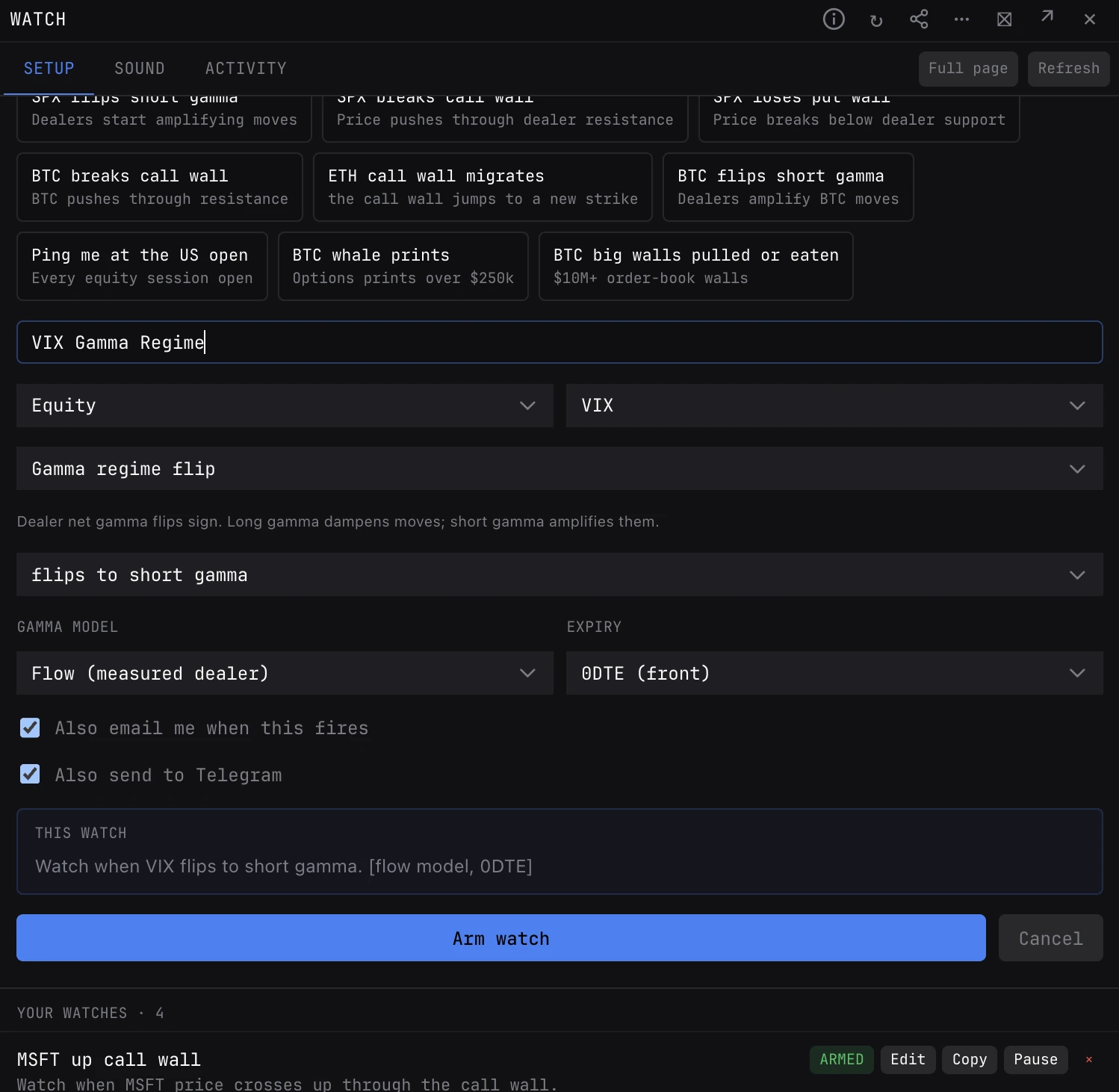
- Setup. Pick crypto or equity and a symbol, then flip the Alert me when switches. Each switch arms or deletes a real watch.
- Advanced / custom watch. The full composer under Setup: every condition, its settings, and a plain sentence of exactly what will fire before you press Arm watch.
- Your watches. Every watch you have, with Edit, Copy (makes a paused copy), Pause or Arm, and × to delete. Alerts made on a chart show On chart.
- Sound. How you are told: pause all, quiet hours, each delivery channel, and the alert sound.
- Activity. The feed of alerts that fired, with what fired them. Full page opens the same thing on its own page.
What you can watch
- Levels. Price crossing the call wall, put wall, gamma flip (HVL), max pain or the expected-move band; a level migrating to a new strike; any level moving. Every symbol.
- Regimes. Gamma, charm or vanna flipping sign, a gamma squeeze setup, the IV term structure inverting, delta flow and the put/call premium ratio. Volga (vomma) flips, volga stress and the dealer book regime are crypto only; the 25 delta risk reversal is US only. Terms: see Analytics glossary.
- Options flow. Whale orders by premium: BTC and ETH prints, or US sweeps, blocks and large orders. Dark pool prints on US stocks and ETFs, by size or share of daily volume.
- Perps. Liquidation flushes, CVD divergence and flow marks (the chart’s Order flow marks) on BTC, ETH, SOL and HYPE. Walls pulled or eaten, icebergs (refilled hidden size) and sweeps on the BTC and ETH book.
- Price and time. A price or a % move, the US open or close, the 08:00 UTC crypto settle, or a scheduled report.
How you are told
- In the app. A toast, on by default. Keep alerts until dismissed holds them on screen.
- Browser and push. Browser notifications (off by default) while a tab is open. Web push reaches you with every tab closed, turned on per device. Paid plans.
- Email and Telegram. Email has a master switch. Connect Telegram opens the BackQuant bot; press Start there and new watches go to that chat. Send all to Telegram adds it to the ones you have.
- Quiet. Pause all alerts, or set quiet hours. A sound is off by default, with presets and a Test button.
The custom watch composer
- Templates
- Ready-made watches such as SPX flips short gamma or Ping me at the US open.
- Name
- Optional. Shown on the alert.
- Asset / Symbol / Condition
- What to watch. The fields below the condition change with it.
- Gamma model
- Flow (measured dealer), the default, or Standard (OI): FLOW and STD on the other panels. Regime and flow conditions on crypto need Flow, so BTC and ETH.
- Expiry
- 0DTE (front), the default, 1DTE (next) or All (near-dated).
- Also email me / Also send to Telegram
- Extra delivery for this watch only.
- This watch
- A plain sentence of exactly what will fire. Read it before you press Arm watch.
Good to know
- Free plan: up to 3 watches, on ETH, delivered in the app only, so you are told only while a tab is open.
- You can also make a watch from the bell beside a level on panels, from a chart (price lines and indicator alerts, shown as On chart), or by asking AI.
- Liquidation alerts re-arm once the window falls back under 80% of your size, so one flush sends one alert. Dark pool alerts send at most 3 in 10 minutes, then a summary.
Pairs well with
Questions
Do alerts work when the terminal is closed?
Yes, on paid plans. Watches run on our servers; turn on web push, email or Telegram to be told with every tab closed. On the free plan alerts arrive in the app only.
Is this a watchlist?
No. WATCH holds alerts. A list of markets to trade is Watchlist and markets (XWATCH) on the trade page, and the chart has its own watchlist beside its charts.
Why can I not pick a condition on my symbol?
Some conditions only exist where the data does: book events and whale prints on BTC and ETH, liquidations and flow marks on BTC, ETH, SOL and HYPE, dark pool prints on US stocks and ETFs, the risk reversal on US tickers.