Gamma Exposure
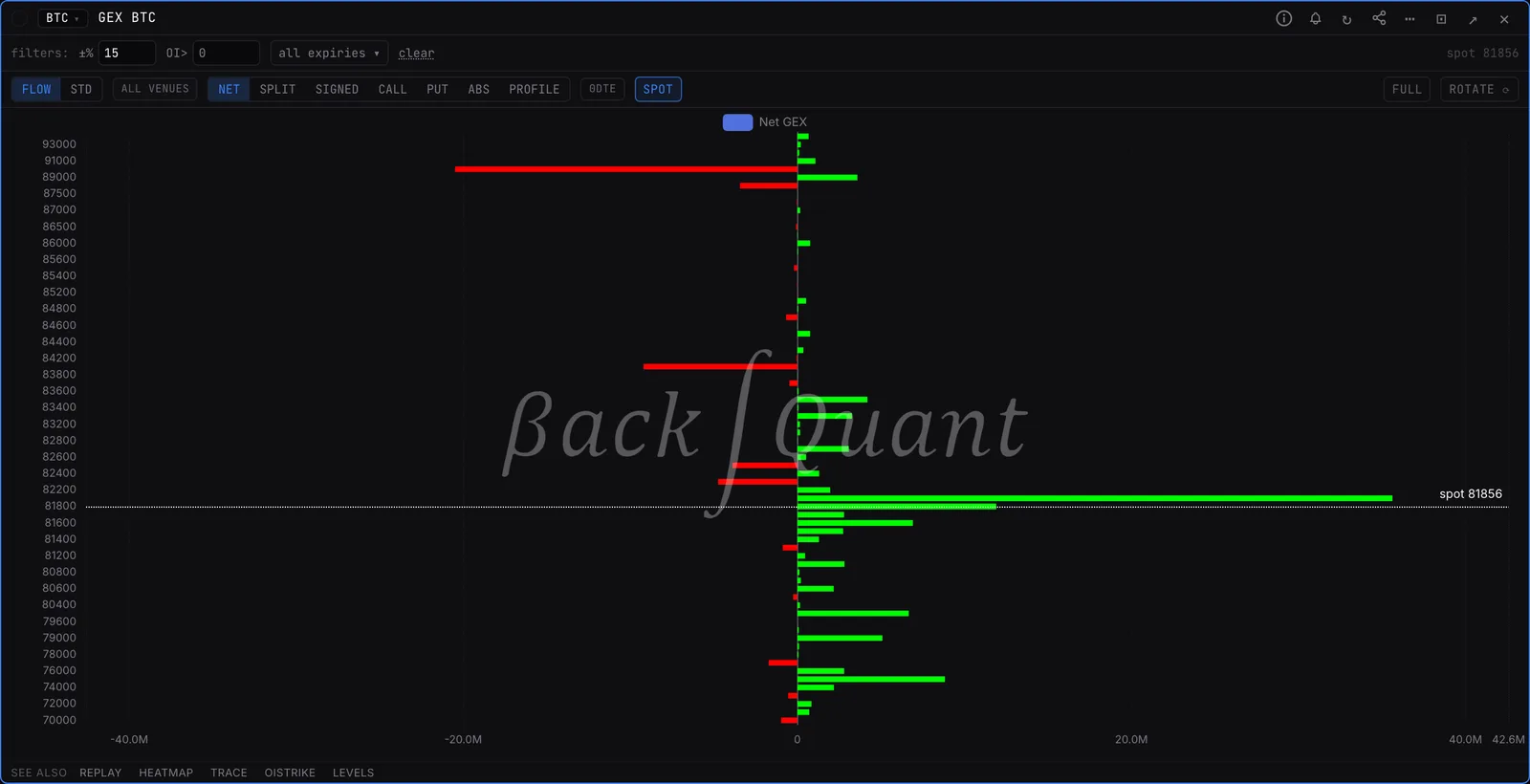
Dealer gamma at every strike. Where dealers are long gamma their hedging dampens moves, where they are short it amplifies them, and the biggest strikes are walls price tends to stall at.
GEXCrypto options (BTC, ETH, SOL, HYPE) and US options, including SPX, SPY, QQQ and single stocks.
Typing it
GEXSymbol>GEXSPX
Opens the SPX gamma profile across every listed expiry.
What you see
- Bars. Net gamma at each strike. Green means dealers are long gamma there, red means short.
- Spot line. The dotted line marks the current price, so you can see which walls sit above and below.
- Walls. The tallest bars. Price tends to stall or pin near them, especially into expiry.
What to look for
- Long gamma around spot: dealers buy dips and sell rips, so moves get absorbed.
- Short gamma around spot: dealers chase the move, so moves get bigger.
- Filter to 0DTE to see what drives today rather than the long tail of expiries.
Controls on the GEX panel
- FLOW / STD
- FLOW signs dealer positions from the measured aggressor tape. STD uses the textbook convention: dealers long calls, short puts.
- NET / SPLIT
- One net bar per strike, or calls and puts drawn separately.
- CALL / PUT / ABS
- Only calls, only puts, or absolute size with the sign removed.
- PROFILE
- Cumulative gamma across strikes, showing where the book flips sign.
- 0DTE
- Only contracts expiring today.
- ±% / OI>
- Trim strikes far from spot or with little open interest.
Also on the chart
The same data can sit on the price chart. Press / on the chart and search for:
Pairs well with
LEVELSTRACEGEXCHARTOISTRIKEHEATMAP
Questions
What is GEX?
Gamma exposure: how much delta dealers must hedge for each move in the underlying, summed by strike. It tells you where hedging flows will push back against price and where they will push with it.
How do I open it?
Type GEX followed by a ticker in the command bar, for example GEX SPX or GEX BTC, and press Enter. With no ticker it opens your default symbol.