

Delta Drift
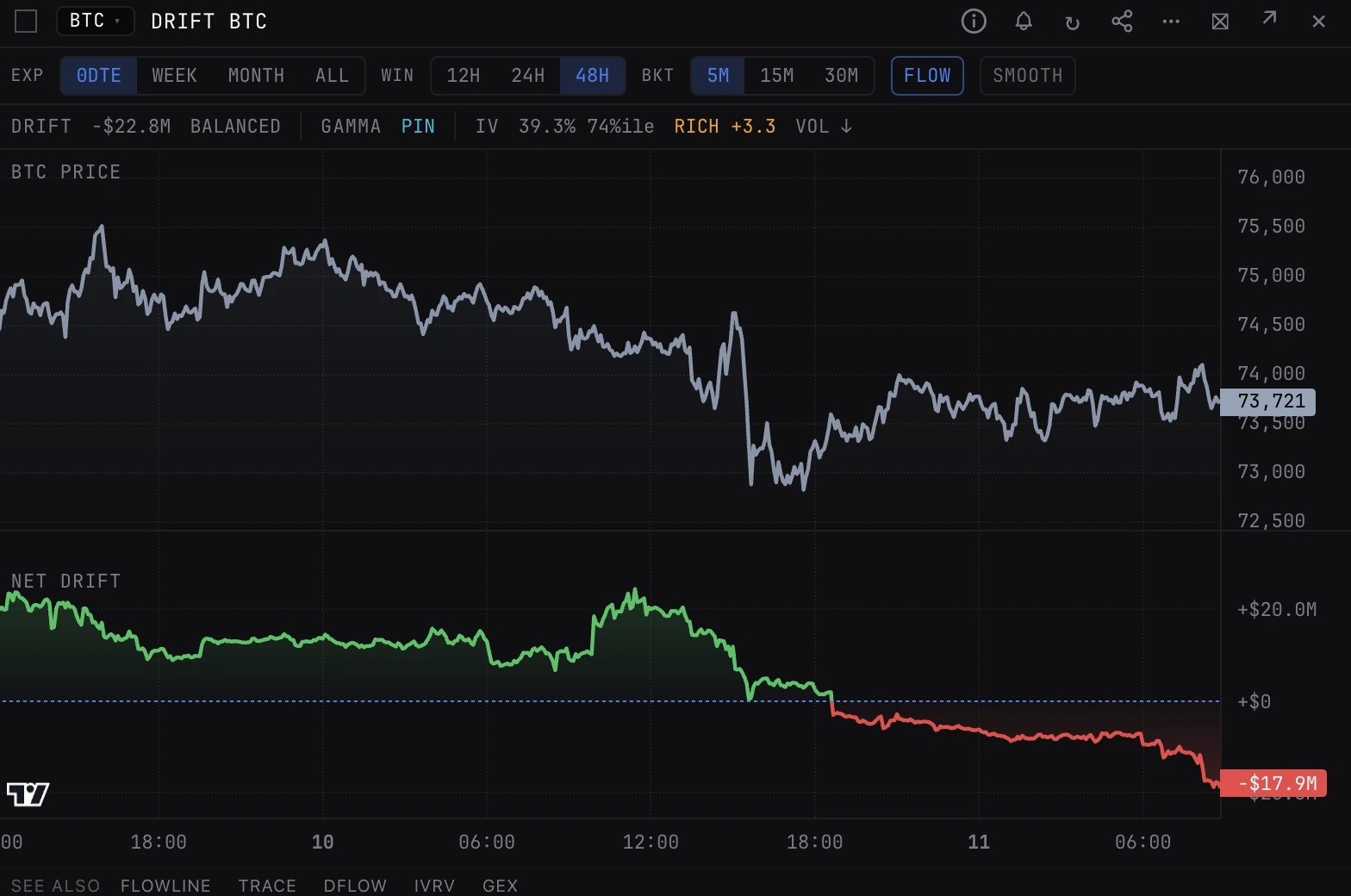
Shows whether options traders are pushing one ticker's delta up or down: price on top and the measured net delta flow below, on one time axis. A status strip adds the dealer gamma regime and whether implied vol is rich or cheap.
DRIFTNETDRIFTVOLDRIFTDRFTBTC and ETH (the measured crypto options tape) and the 45 US options names (4 indices, 14 ETFs and 27 stocks). Other symbols show a note instead of data.
Typing it
DRIFTSymbolexpiry=window=What you see
- Price. The underlying in the top pane, on the same time axis as the drift.
- NET DRIFT. The cumulative net delta customers traded in the window, in dollars of delta. This is measured flow: each trade signed by its aggressive side (customers are the aggressors, dealers take the other side). Above zero is net buying, below net selling.
- Drift. The latest drift with BUYING, SELLING or BALANCED.
- Gamma. The gamma regime, how dealer hedging reacts to moves. AMPLIFY when dealers are short gamma, so their hedging adds to moves. PIN when they are long gamma, so hedging fades moves. Crypto only.
- IV. Implied vol now and its percentile over the last 90 days. RICH or CHEAP is IV minus realized vol, and the VOL arrow says whether IV is rising, falling or flat.
What to look for
- Price rising while the drift falls, or the reverse: the move is not backed by options flow.
- Drift and regime together. Steady buying under AMPLIFY means hedging can add to the move. The same buying under PIN tends to be absorbed.
- The drift changing sign through the session, or the regime flipping between AMPLIFY and PIN.
- The strip only states facts. How you combine drift, regime and vol is your read.
How it differs
- FLOWLINE. The same measured flow on its own, in delta, gamma or vega, with venue and strike cuts. On BTC and ETH, DRIFT reads that tape with every venue on. DRIFT adds price, the gamma regime and the vol read, and starts on 0DTE.
- DRIFTSCAN. The DRIFT read for many tickers at once, one row each, with no chart.
- TRACE. Projects dealer gamma, charm and vanna forward. DRIFT looks back at what was traded.
Arguments and controls
- expiry=
- Crypto: 0dte (default: expiring the same UTC day as the trade), weekly, monthly or all. The Exp buttons read 0DTE, WEEK, MONTH and ALL.
- window= (crypto)
- 12, 24 (default) or 48 hours. The Win buttons read 12H, 24H and 48H.
- window= (US options)
- 1d, 5d (default) or 30d. There is no expiry choice on US options.
- Bkt
- Crypto bucket width: 5m (default), 15m or 30m.
- FLOW / STD
- A tag, not a switch. FLOW when the window has measured tape behind it, STD when it has none yet.
- Smooth
- Smooths the drift line. Off by default.
- OI ref
- US options only. Overlays the open interest net delta, where positioning already sits, against the measured flow. Off by default.
Good to know
- The 48 hour window only applies to 0DTE. WEEK, MONTH and ALL are clamped to 24 hours.
- This is traded flow, not open interest. Measured flow only runs forward, so a window can be blank until the tape fills.
- With no symbol, DRIFT opens on your default symbol.
Also on the chart
The same data can sit on the price chart. Press / on the chart and search for:
Pairs well with
Questions
Does DRIFT tell me to buy or sell?
No. It states the drift, the gamma regime and the vol read. The interpretation is yours.
How is DRIFT different from FLOWLINE?
Both draw measured delta flow. DRIFT puts it under price with the gamma regime and IV, starting on 0DTE. FLOWLINE draws delta, gamma or vega flow on its own, starting on every expiry.
Why does SOL show a note?
DRIFT reads the measured aggressor tape, which covers BTC and ETH among crypto coins.