


Economic Calendar
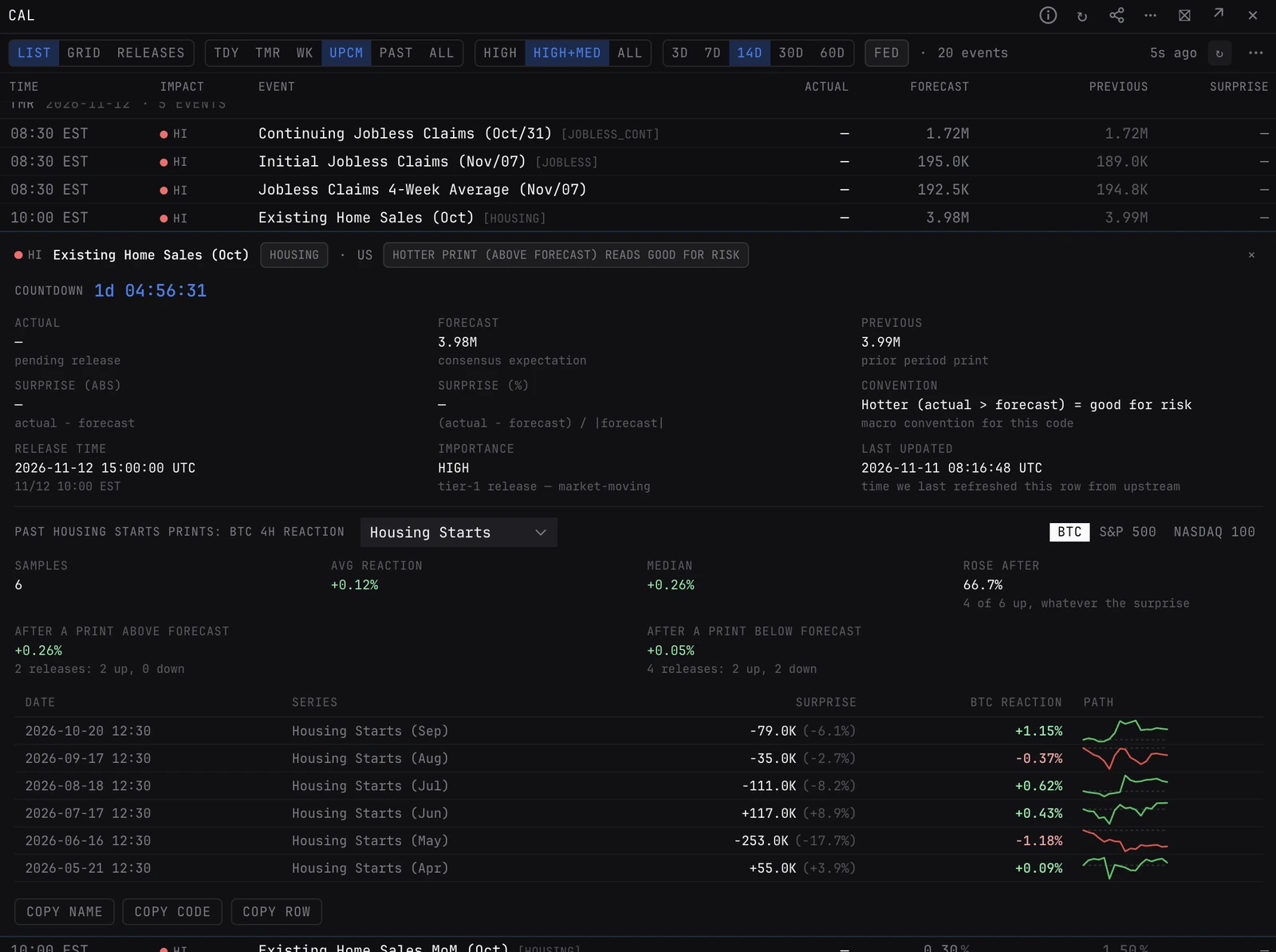
US macro releases with impact, forecast, actual and surprise. Expand any event for the full numbers and how BTC, the S&P 500 or the Nasdaq-100 moved after past prints of the same release.
CALENDARCALEVENTSECONGlobal. The panel takes no ticker: it shows US macro data that applies to every market.
Typing it
CALENDARWhat you see
- LIST. Where it opens: one row per release, grouped by day, with time, impact, event, actual, forecast, previous and surprise. Times and days follow your display timezone; a dash in the time column is a daily event with no published time.
- Impact. Red dot is high, amber medium, slate low.
- Surprise. Coloured by what the print means for risk, not by its sign. A hotter CPI, PPI, PCE or claims print reads red; a stronger NFP, GDP, ISM or retail sales print reads green.
- Expand. Click a row for actual, forecast, previous, the surprise in units and per cent, the convention used and a risk-on or risk-off read, then the move over 4 hours after the last 8 prints of that release, for BTC, the S&P 500 or the Nasdaq-100.
- GRID and RELEASES. GRID draws the same window as a calendar. RELEASES lists when the macro series the terminal carries are next published; click one to add it to a chart as a Macro series pane.
How to read it
- Find the next high-impact print, so you know what your position is exposed to and when.
- Before a release, expand it to see how the market moved after the last few. A big average move with a mixed direction is a vol event, not a directional one.
- Turn on FED to see only FOMC decisions and Fed speakers.
- PAST shows recent releases with their actuals, to check what the market has already absorbed.
Controls on the CALENDAR panel
- LIST / GRID / RELEASES
- A dense table (the default), a calendar grid, or the publication dates of the macro series the terminal carries.
- TDY / TMR / WK
- Today, tomorrow, or the 7 days from today.
- UPCM / PAST / ALL
- The next N days (the default), the past N days with actuals, or N days either side.
- N days
- 3, 7, 14 (the default), 30 or 60. Shown with UPCM, PAST and ALL.
- HIGH / HIGH+MED / ALL
- Impact filter. HIGH+MED is the default; ALL adds low-impact releases.
- FED
- Only FOMC decisions and Fed speakers. Off by default.
- 14d / 30d / 45d
- In RELEASES: how far ahead to list. 30d is the default.
Good to know
- The panel refreshes every 5 minutes. The header shows how long ago it last fetched.
- RELEASES uses FRED's release calendar, in US dates, and leaves out series published every business day, such as rates, VIX and credit spreads. To find and preview any one series, use MACRO.
- The reaction history in an expanded row covers the last 8 prints. SURPHIST shows up to 48, with the move split by surprise.
Pairs well with
SURPHISTEARNINGSCPITYIELDSMACROREG
Questions
Which releases are on the calendar?
US macro releases such as CPI, PPI, PCE, NFP, FOMC, GDP, ISM, retail sales, jobless claims and Fed speakers. Pick ALL in the impact filter to include low-impact events.
Why is a hotter print red for CPI but green for NFP?
The surprise is coloured by its read for risk assets. Inflation above forecast is bad for risk, so it reads red. Jobs or growth above forecast is good for risk, so it reads green.
How is CALENDAR different from SURPHIST?
CALENDAR is what is coming and what just printed, with a short reaction history per event. SURPHIST takes one release and studies every past print in depth.