


Vex scripts
Vex is our indicator language, open to every account. Write your own indicators on BackQuant data, or describe one in words, and draw it on any chart.
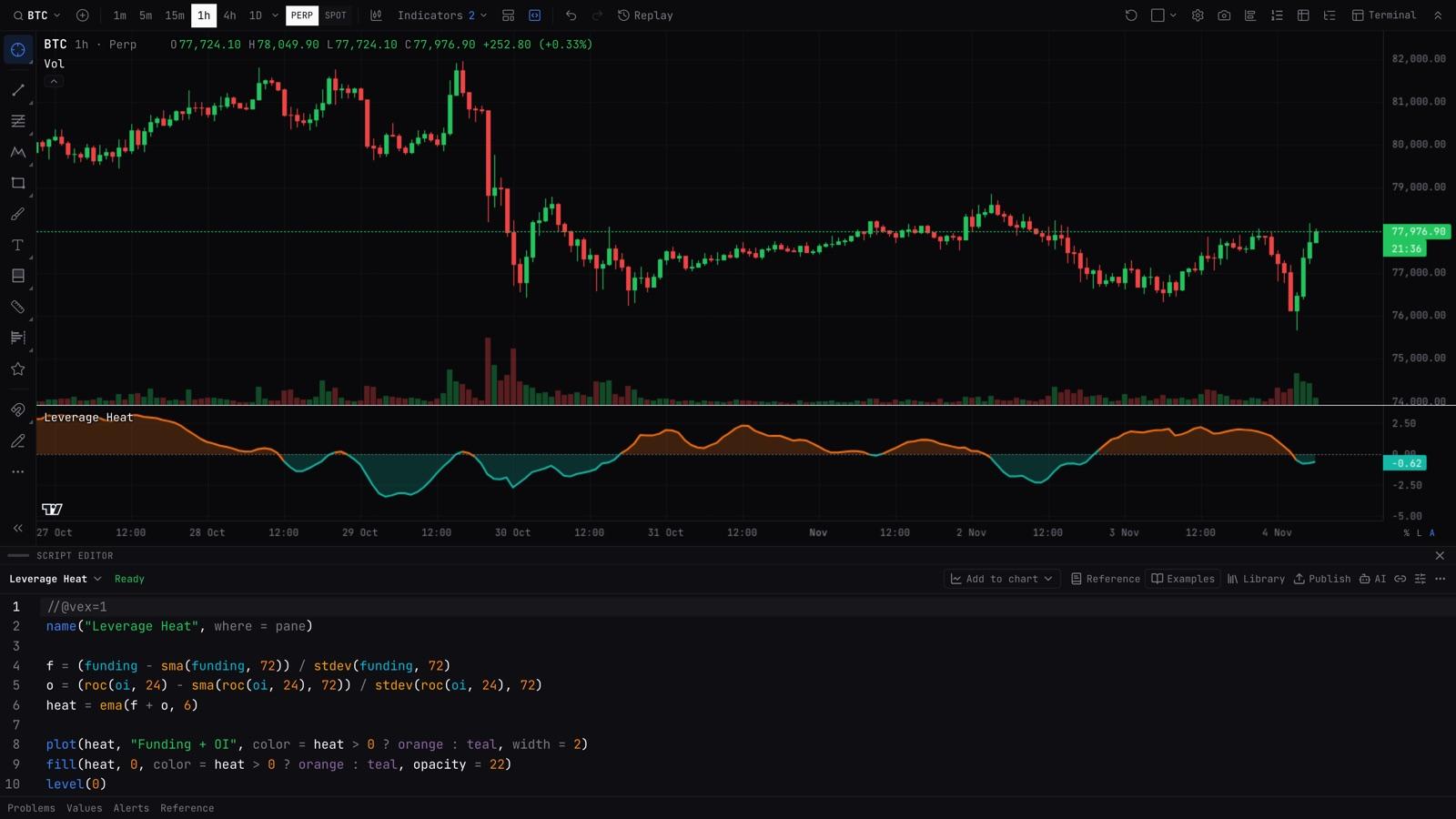
Open the editor
>SCRIPT
Opens the Script Editor. Write a script, then Add to chart.
A real script
Leverage Heat, the indicator in the picture above. It reads funding and open interest straight from BackQuant data, scores how stretched each one is against its own history, and draws the two together under the chart.
1//@vex=12name("Leverage Heat", where = pane)3 4f = (funding - sma(funding, 72)) / stdev(funding, 72)5o = (roc(oi, 24) - sma(roc(oi, 24), 72)) / stdev(roc(oi, 24), 72)6heat = ema(f + o, 6)7 8plot(heat, "Funding + OI", color = heat > 0 ? orange : teal, width = 2)9fill(heat, 0, color = heat > 0 ? orange : teal, opacity = 22)10level(0)BackQuant data is built in
- Built-in series. GEX, the gamma flip, call and put walls, funding, open interest and ETF flows, next to price and volume.
- Other timeframes and symbols. Read another timeframe or another symbol inside a script, with no lookahead.
Let AI write it
- Describe it. Say what the indicator should show and it writes the script.
- Change it. Ask it to modify the script you have open.
- Convert it. Paste in a TradingView script and get it back in Vex. It fixes its own errors and tries again.
Alert on it, share it, publish it
- Alerts. Scripts work with alerts, so a condition you code can tell you when it happens.
- Share links and version history. Send a script with a link, and go back to any earlier version.
- Library. Publish a script for other traders to add to their charts, or start from the nine official indicators, each with a live chart preview.
Guide
Getting startedWhat Vex is, and your first script.Lines and commentsOne statement per line; indent to carry on.The version line//@vex=1 on the first line says which Vex a script is written for.Names and formulasname = formula; operators; each name set once, in any order.SettingsA plain value at the top is a setting; int(), float() and friends add a label and limits.Picking a value: if and ? :if c then a else b, or c ? a : b, picks a value per bar.Looking back: prevprev(x) is x on the bar before; prev(x, n) is n bars back.Values that carry over: startsA name reading its own prev, with a starts line for the first bar.Your own functionsname(a, b) = formula; longer ones indent their lines.Results with several partsbands(), macd() and others give several lines: pick one with a dot.Drawingplot, level, fill, mark, bar_color, background; where a script draws.ColorsNames, #hex, up and down, and colors that change per bar.Marks, finished bars and alertsmark() and alert() on yes/no conditions; "and closed" for finished bars.Empty valuesNot enough history, a division by zero, or none.BackQuant datagex, vanna, charm, oi, funding, liquidations, iv and premium as series.Other timeframes and marketstimeframe("4h", x) and symbol("ETHUSDT", x): a formula on other bars.Coming from Pine ScriptThe usual Pine words and what Vex writes instead.Writing scripts with an AIThe AI prompt button copies a prompt that teaches any AI the language.Errors and the value inspectorWhat the editor tells you, and how to see every value.LimitsHow big a script can be.
Reference
Every function, with its arguments, what it returns, its Pine Script equivalent and an example. The same reference is in the Script Editor (press Reference), searchable by Pine name.
SettingsVex reference: settings.DrawingVex reference: drawing.FormulasVex reference: formulas.Bar valuesVex reference: bar values.BackQuant dataVex reference: backquant data.AveragesVex reference: averages.WindowsVex reference: windows.IndicatorsVex reference: indicators.EventsVex reference: events.Other barsVex reference: other bars.MathsVex reference: maths.ColorsVex reference: colors.
For AI tools
Every page here is also plain Markdown at its address plus .md, and the whole language is one file at /documentation/vex/llms-full.txt. Give that file to any AI and it can write Vex.