


Structures and packages
Several option legs as one trade: built from the chain’s Strategies, the Structures panel or clicks on the chain, then sent from the multi-leg ticket to the order book as a package, as a block RFQ, or as the exchange’s listed combo, with an optional hedge. New to these words? See New to trading.
STRUCTXCHAINTrade page (+ Panel, Structures; the chain’s Strategies) and Pro terminal
What it is for
Spreads, straddles, condors, calendars and any custom set of legs, built in one place and traded together. Three ways in: the chain’s Strategies strip (one click, strikes chosen for you), the Structures panel (exact strikes, expiries and ratios), or clicking several bids and asks in the chain.
All of them land in the multi-leg ticket, which shows what you pay or receive, the package’s greeks and payoff, and sends it the way you choose.
Strategies, on the chain
Press Strategies on the option chain. Pick Buy or Sell (Buy by default) and Wings, how far the wings sit from spot: 2.5%, 5% (default) or 10%. Then a shape: it replaces the ticket’s legs with the listed strikes nearest the width, each at the smallest size and at the touch (the mark where a side has no quote). A strike not open yet is never a leg. A leg with no price yet is said, to set in the ticket before sending.
| Shape | Buy | Sell |
|---|---|---|
| Call spread | Call at spot, sell one higher | Credit, for down or flat |
| Put spread | Put at spot, sell one lower | Credit, for up or flat |
| Straddle | Call and put at spot | Price stays put; loss unbounded |
| Strangle | Put below, call above | A range; loss unbounded |
| Butterfly | A call each side, sell two at spot | Away from spot, capped |
| Iron condor | Buy a strangle, sell wider wings | Credit for a range, capped |
| Risk reversal | Buy a call above, sell a put below: long, near free | Sell the call, buy the put: short, near free |
- Buy
- Call at spot, sell one higher
- Sell
- Credit, for down or flat
- Buy
- Put at spot, sell one lower
- Sell
- Credit, for up or flat
- Buy
- Call and put at spot
- Sell
- Price stays put; loss unbounded
- Buy
- Put below, call above
- Sell
- A range; loss unbounded
- Buy
- A call each side, sell two at spot
- Sell
- Away from spot, capped
- Buy
- Buy a strangle, sell wider wings
- Sell
- Credit for a range, capped
- Buy
- Buy a call above, sell a put below: long, near free
- Sell
- Sell the call, buy the put: short, near free
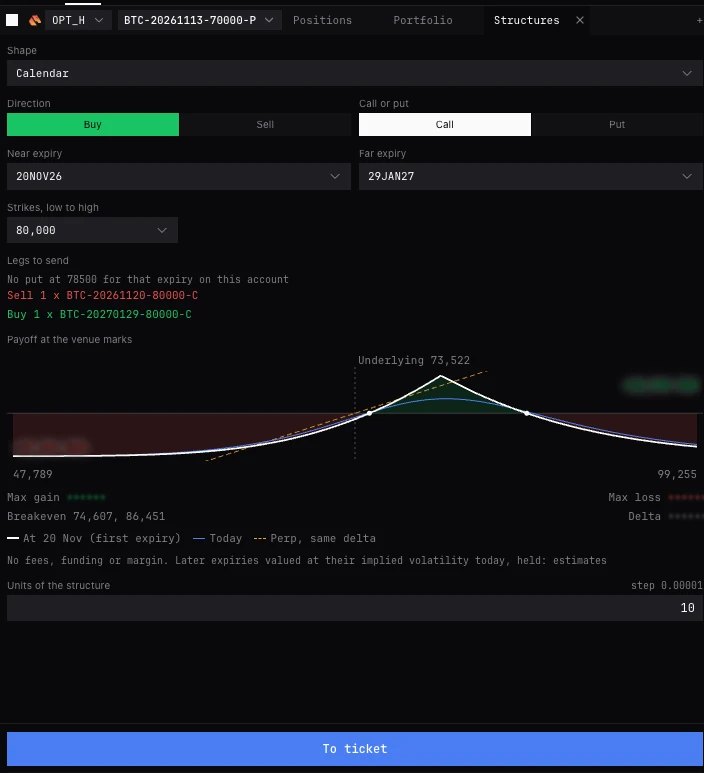
The Structures panel (STRUCT)
- Shape
- Vertical, Straddle, Strangle, Butterfly, Condor, Iron condor, Calendar, Diagonal or Custom. Default Vertical.
- Direction
- Buy (default), or Sell, which turns every leg over.
- Call or put
- For the shapes that take one: Vertical, Butterfly, Condor, Calendar, Diagonal. Default Call.
- Expiry, Near expiry, Far expiry
- One expiry, or near and far for Calendar and Diagonal; the far list offers only later ones. The underlying is the selected option’s, else the chain’s first (BTC first).
- Strikes, low to high
- As many as the shape needs, K1 to K4. On a Diagonal the second strike is from the far expiry.
- Legs (Custom)
- Add leg, then any instrument the account lists and a whole-number ratio; a negative ratio is the opposite side. Remove takes one off.
- Legs to send
- Every leg in words, buys green and sells red, before anything goes, with what is missing under it.
- Payoff at the venue marks
- The structure’s payoff at the exchange’s marks.
- Units of the structure
- How many of it, a multiple of the option’s size step (shown beside it).
- Listed combo
- Where the exchange lists the same package (Deribit), a box names it: Combo limit price, then Buy or Sell and its name. It trades as one good-till-cancelled order after you confirm; what you hold afterwards is its legs.
- To ticket
- The legs into the ticket, each at its touch (a buy at the ask, a sell at the bid), to send to the book, as one RFQ, or as a listed combo.
- Request block quotes
- Sends the structure as an RFQ after Send request: makers quote it in the RFQ panel. A request does not trade. An account whose exchange takes none reads This account cannot request block quotes.
Shapes, bought
Bought, every shape is the debit side. Sell turns each leg over.
- It says what is missing before it sends: Choose 2 strikes, Strikes must rise from first to last, Choose a far expiry, The far expiry must be after the near one, No call at that strike for that expiry on this account, or the exchange’s own leg limit.
| Shape | Strikes | Legs |
|---|---|---|
| Vertical, call | 2 | +1 K1, -1 K2 |
| Vertical, put | 2 | -1 K1, +1 K2 |
| Straddle | 1 | +1 call K1, +1 put K1 |
| Strangle | 2 | +1 put K1, +1 call K2 |
| Butterfly | 3 | +1 K1, -2 K2, +1 K3 |
| Condor | 4 | +1 K1, -1 K2, -1 K3, +1 K4 |
| Iron condor | 4 | -1 put K1, +1 put K2, +1 call K3, -1 call K4 |
| Calendar | 1 | -1 near K1, +1 far K1 |
| Diagonal | 2 | -1 near K1, +1 far K2 |
- Strikes
- 2
- Legs
- +1 K1, -1 K2
- Strikes
- 2
- Legs
- -1 K1, +1 K2
- Strikes
- 1
- Legs
- +1 call K1, +1 put K1
- Strikes
- 2
- Legs
- +1 put K1, +1 call K2
- Strikes
- 3
- Legs
- +1 K1, -2 K2, +1 K3
- Strikes
- 4
- Legs
- +1 K1, -1 K2, -1 K3, +1 K4
- Strikes
- 4
- Legs
- -1 put K1, +1 put K2, +1 call K3, -1 call K4
- Strikes
- 1
- Legs
- -1 near K1, +1 far K1
- Strikes
- 2
- Legs
- -1 near K1, +1 far K2
The multi-leg ticket
- Name
- The package as a trader names it, as Bull call spread BTC 27 Dec 90k / 100k, and how many legs.
- Size x0.5, x2
- Halve or double every leg, rounded down to each leg’s size step.
- Each leg
- Buy or Sell (switching re-prices it at the touch), the instrument, Remove, Size and Limit, then its bid, mark and ask to click into Limit, and its IV. A leg that would be refused as an order says why under it.
- Remove
- Takes a leg off. At one leg it is an ordinary order again.
- Pay, Receive
- The net premium, summed per currency. It reads Net with Set every leg’s size and price until every leg counts.
- Delta, Gamma 1%, Vega, Theta
- The package’s greeks: delta in the coin, the rest in dollars.
- Payoff
- This order, or With your book (with what you hold on the coin), at expiry and today, with Max gain, Max loss and Breakeven. Across expiries the later legs are estimated and say est.
- Hedge
- None or Keep neutral, with the package’s delta (below).
- Send to
- Order book (default), RFQ, or Combo where the exchange lists these legs. The line under it says how the legs will go.
- The button
- Send 3 orders · pay 0.0125 BTC, Send package and hedge, Request quotes, or Buy and the combo’s name. It opens a confirm with the account and exchange, every leg, You pay or You receive and the payoff.
- Clear legs
- Empties the ticket.
Sending to the order book
- Two to four option legs
- They go as one package. The first buy goes first (with no buy, the least liquid leg), and no sell works past what every buy has filled. No leg runs more than a tenth of the package ahead of the slowest. If a leg ends (refused, cancelled), the others stop at what it filled.
- Other sets of legs
- Leg by leg, each its own good-till-cancelled limit: the buys first, the sells only once every buy has filled, and none after a leg that is refused. Until then it reads The sells go once every buy has filled.
- Prices checked
- Each leg’s limit against its own book: far through it blocks the send; somewhat through it is said in the confirm.
- After sending
- Each leg’s line, its state and fill (Now filled 1 of 2). A leg the exchange refuses is tried again for a while and says so. If a leg did not go through, the ticket says which, with Cancel the working legs.
- Not known
- If a leg may or may not be at the exchange, it says to check the Orders tab of Positions and orders, and sends nothing until you press I have checked.
RFQ and Combo
- RFQ
- Makers quote the legs as one package, in their ratios. The prices on the legs are not sent. While the request is out, the ticket shows it with its quotes; take one or cancel it there or in the RFQ panel. New request starts another once it ends.
- Combo
- Where the exchange lists these legs as one instrument (Deribit): one order at the combo’s limit price, all legs or none, good till cancelled.
Hedge: None or Keep neutral
At the foot of the multi-leg ticket, with the package’s delta. Keep neutral starts the account’s Auto-hedge for the coin with the package, every figure shown and editable before anything goes. It runs in BackQuant’s engine in your browser, which every BackQuant tab shares: closing one tab stops nothing while another is open, in Chrome and Edge a reload finds it still running, and it stops when the last tab closes. Among the options exchanges it starts on Deribit; on Bybit, Derive and OKX it is greyed and says the way that works: Auto-hedge on a Hyperliquid account with this one ticked (a Deribit account can count it too). Every setting, and how it decides: How Auto-hedge works.
- Already running
- Where Auto-hedge already keeps the coin on this account, the package joins it: the hedger keeps the coin’s book near its target, so it hedges this package too.
- This package only
- Two to four option legs sent to the order book: the button reads Send package and hedge. The legs go as one package, then a hedger counting only their fills keeps them near zero delta, inside the band. Your other positions and trades in the coin are not counted.
- The book as it is
- Otherwise, before the orders go, the hedger measures the coin’s book on this account and keeps it where it is, inside the band. So it hedges what the package changes, and any trade in the coin on this account while it runs. A preview shows the book it will keep.
- With
- The perpetual, future or spot pair it trades.
- Rebalance beyond ±
- The band, in the coin (Let it drift by in the Auto-hedge window). Set to a quarter of the package’s delta.
- Max per rebalance, Max per hour
- Largest rebalance and Most per hour in the Auto-hedge window. Set to the package’s delta, and three times it.
- More limits
- Largest hedge position (twice the package’s delta), Price protection (bps), the Auto-hedge window’s Price within bps, 50 by default, and Count the coin balance, No by default.
- If the hedger is refused
- The ticket says the legs are working unhedged, with Cancel the legs.
- What it needs
- Notifications on, and, for each account on Deribit, Bybit, OKX or Binance this hedger trades or reads, the tick This is the only API key I use with BackQuant.
- One hedge per book
- A hedger for the whole coin never runs beside a package’s own: it says so and asks you to stop one first.
Building a spread
- 01Open Structures (STRUCT), or press Strategies on the chain.
- 02Choose the shape, Buy or Sell, call or put, the expiry and the strikes. Read Legs to send and the payoff.
- 03Set Units of the structure, then To ticket.
- 04In the ticket, adjust each leg’s limit (click its bid, mark or ask), and read Pay or Receive and the greeks.
- 05Choose Send to: Order book, RFQ, or Combo. Choose a hedge if you want one.
- 06Press the send button, read the confirm, and send.
By exchange
- Deribit
- Listed combos, block RFQ by price levels, and Keep neutral.
- Bybit
- Options on Cross or Portfolio Margin only. Outside Portfolio Margin each short leg is margined on its own: when the legs need more than is available the ticket says so in red, and the confirm asks for Send anyway. Send it as an RFQ, or switch the account to Portfolio Margin, to have it margined as one. Block RFQ by named quotes.
- Derive
- Block RFQ by named quotes.
- OKX
- Packages on the order book; no block RFQ or combos.
Once you hold it
A package you hold is listed with its legs in Positions and orders. Open it there for its hedge as it runs (the delta against the band, its last decisions, Pause hedging and Stop hedging) or to close it.
Questions
What is the difference between a package and a combo?
A package is your legs worked as separate orders that BackQuant keeps together. A combo is one instrument the exchange lists: one order, all legs or none.
Why did only the buys go?
Sent leg by leg, the sells wait until every buy has filled, so you are never short a leg without its protection. Cancel the buys to send nothing more.
Can I hedge a package on Bybit?
Keep neutral starts on Deribit among the options exchanges. On Bybit, run Auto-hedge on a Hyperliquid or Deribit account with the Bybit account ticked.
Why does Pay read Net?
A leg has no size or price yet. The net figure shows once every leg counts.
Does To ticket send anything?
No. It loads the legs. Only the ticket’s send button, after its confirm, sends.
More
- Block RFQ. Following a request and taking a quote.
- How Auto-hedge works. Keep neutral and every hedger setting.
- How exits, closes and rolls work. How multi-leg orders are sent.