


The option chain
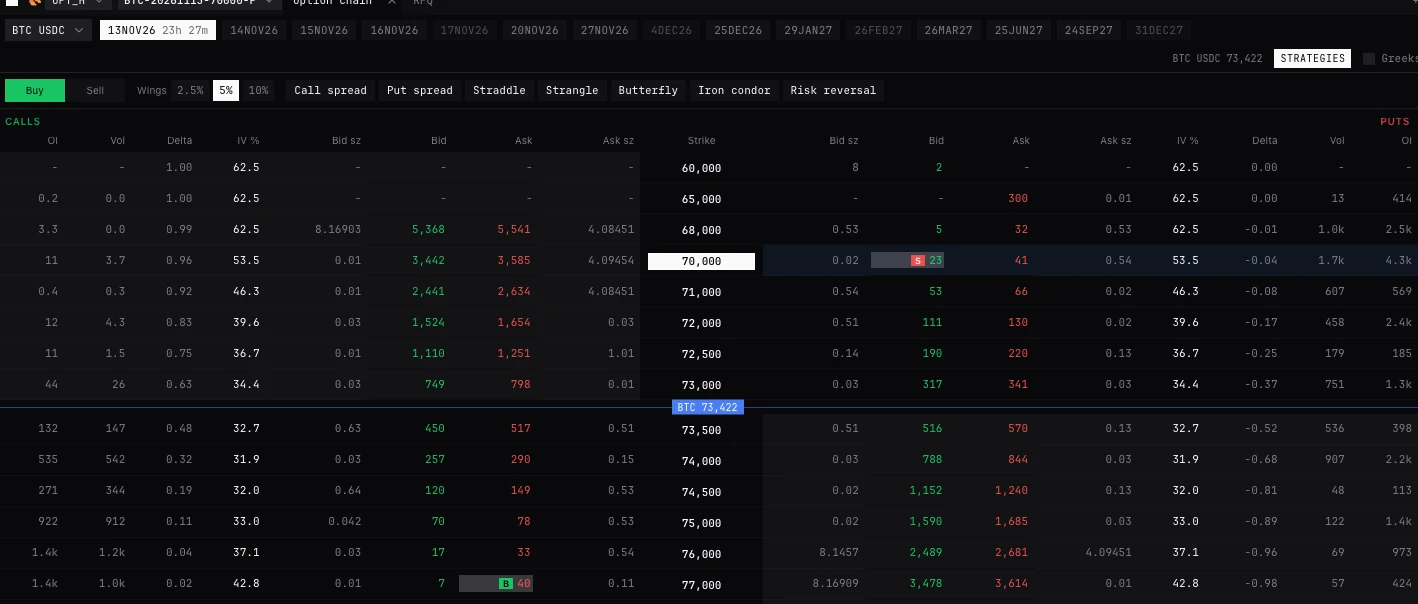
The exchange’s calls and puts for one coin and expiry, strike by strike, priced live. A click on a bid or an ask puts that option in the ticket; more clicks make a package. On Deribit, Bybit, Derive and OKX. New to these words? See New to trading.
XCHAINEXEC OPTIONSTrade page (Options workspace, or + Panel, Option chain) and Pro terminal (EXEC OPTIONS)
What it is for
Picking and pricing options on the exchange you trade. The chain shows the exchange’s own bids, asks, sizes, implied volatility and delta for every strike of one expiry, with BackQuant’s open interest, volume and greeks beside them where BackQuant has the chain.
Nothing sends from the chain. A click loads the ticket, which shows the premium, the payoff and the greeks before you send. Two clicks or more make a multi-leg ticket: see Structures and packages.
The header
- Margin note
- Bybit only, on Isolated Margin: options trade only on Cross or Portfolio Margin. The note says so, with Switch to Cross Margin.
- Underlying
- Where the account lists more than one option family: BTC first, then ETH, then the rest by how many options each lists. On Deribit, BTC settled in BTC and in USDC are separate.
- Expiry tabs
- Nearest first. The chain opens on the nearest expiry still trading with more than an hour to run. The chosen tab shows the time left; hover any for it. A dimmed expiry is listed but not trading yet: the chain says when it opens where the exchange says.
- Underlying price
- The underlying and the price these options are on: the exchange’s underlying price for them, not a perpetual’s mark.
- Strategies
- Opens the strategy strip: one-click spreads, straddles and more. Off by default. See Structures and packages.
- Greeks
- Adds BackQuant’s Gamma, Vega and Theta on the outer edges. Off by default.
The grid
- Calls, Strike, Puts
- Calls on the left, puts on the right, strikes down the middle.
- Call columns
- From the outside in: OI, Vol, Delta, IV %, Bid sz, Bid, Ask, Ask sz. Puts mirror them: Bid sz, Bid, Ask, Ask sz, IV %, Delta, Vol, OI.
- Whose figures
- Bid, ask, sizes, IV and delta are the exchange’s. OI and Vol are BackQuant’s, and show only where BackQuant has the chain.
- Spot line
- A line between the two strikes the underlying sits between, with its price on it. The chain scrolls to the strike nearest the money once per expiry, never again while you scroll.
- Shading
- In-the-money cells are faintly shaded. The option selected (by clicking its strike) is tinted across its half of the row. A price already in the ticket is marked.
- Greyed strike
- Not open yet: its prices add nothing to the ticket.
- Status line
- Under the grid: what the ticket holds (In the ticket: the side, the option and its price), how many legs are in it, or what a click does.
Clicking the chain
- Click an ask
- Adds a buy at the ask to the ticket. A bid adds a sell. Click it again to take it off. Nothing is sent.
- Hover a price
- What a click does, and for a premium in a coin, about how much a contract is in dollars.
- Size
- Each leg starts at the option’s smallest size, so the package reads whole at once.
- Two legs or more
- The ticket becomes the multi-leg ticket. The book beside it follows the option last clicked.
- Click a strike
- Selects that option for the panels on the chain’s colour, so the book and chart follow it. Sends nothing. With an order in the ticket it does not switch: send it or clear it first.
- No linked ticket
- Where no ticket shares the chain’s colour, the status line says a click stages nowhere you can see, with Open a linked ticket.
One option in the ticket
- Price in
- The exchange’s units, USD, or IV (Black-76 at the underlying price now). It sends the exchange’s price either way.
- Pay, Receive
- The premium, about how much in dollars where it is priced in a coin, and the contract size.
- Payoff
- Folded under the ticket. This order, or With your book (with what you hold on the coin), at expiry and today: Max gain, Max loss, Breakeven, and delta before and after, beside the same delta held as the perpetual.
- In plain words
- What the option is and what it can make or lose, in sentences.
- What if
- At expiry and today, at -20%, -10%, -5%, now, +5%, +10%, +20% and breakeven. This order alone: fees, funding and margin are not in it.
- Hedge on fill
- For an option worked by an algorithm: see Stops, exits and hedges.
Roll to a later expiry
Not a panel: a window from a position’s menu, Roll to a later expiry..., on an option or a dated future. An option rolls into the same strike and call or put, later; a future into a later future. It closes first and opens only what has closed, each leg resting at the touch within its worst price. If the open side cannot fill, the roll stops. Where nothing later of the same kind is listed, it says so. What it sends, in order: How exits, closes and rolls work.
- Into
- The later expiry. Default the nearest.
- Size
- Default the whole position.
- Sell [option] no worse than, Buy [later option] no worse than
- A worst price for each side, with the touch beside it. Both required.
- Open may get ahead by
- Lets the new leg run ahead of the close by up to this much. Optional.
- Cross after s
- How long the legs rest at the touch before crossing once. Default 20; empty never.
Buying an option
- 01Open the trade page’s Options workspace, or EXEC OPTIONS in the Pro terminal, and choose an options account (Deribit, Bybit, Derive or OKX) in the chain’s header.
- 02Pick the underlying and the expiry.
- 03Click the ask of the strike you want: a buy at the ask goes into the ticket at the smallest size.
- 04In the ticket, set the size and price, in the exchange’s units, USD or IV. Read Pay, the payoff and What if.
- 05Send it from the ticket and confirm.
By exchange
- Bybit. Outside Portfolio Margin it margins each short leg on its own, not netted against the long beside it: the multi-leg ticket says what the legs need against what is available.
- Keep neutral. Among the options exchanges, the hedge on a package starts on Deribit. On Bybit, Derive and OKX, start Auto-hedge on a Hyperliquid or Deribit account with the options account ticked.
- Other exchanges. An account that lists no options says so in the chain and names the exchanges that do.
| Exchange | Chain and ticket | Block RFQ | Listed combos | Keep neutral |
|---|---|---|---|---|
| Deribit | Yes | Price levels | Yes | Yes |
| Bybit | Cross or Portfolio Margin | Named quotes | No | Through Auto-hedge on Hyperliquid or Deribit |
| Derive | Yes | Named quotes | No | Through Auto-hedge on Hyperliquid or Deribit |
| OKX | Yes | No | No | Through Auto-hedge on Hyperliquid or Deribit |
- Chain and ticket
- Yes
- Block RFQ
- Price levels
- Listed combos
- Yes
- Keep neutral
- Yes
- Chain and ticket
- Cross or Portfolio Margin
- Block RFQ
- Named quotes
- Listed combos
- No
- Keep neutral
- Through Auto-hedge on Hyperliquid or Deribit
- Chain and ticket
- Yes
- Block RFQ
- Named quotes
- Listed combos
- No
- Keep neutral
- Through Auto-hedge on Hyperliquid or Deribit
- Chain and ticket
- Yes
- Block RFQ
- No
- Listed combos
- No
- Keep neutral
- Through Auto-hedge on Hyperliquid or Deribit
Questions
Why does the chain show no OI or Vol?
Those are BackQuant’s figures and show only where BackQuant has the chain. The exchange’s prices, sizes, IV and delta are always there.
I clicked a strike and the ticket did not change.
A strike click selects the option for the book and chart. With an order in the ticket it stays put: send it or clear it first. To load a price, click the bid or the ask.
Why is an expiry dimmed?
It is listed but not trading yet. The exchange quotes it once it opens.
Can I trade options from the DOM?
No. The DOM ladders perpetuals, futures and spot. Options trade from the chain and the ticket.
Can I price an order in IV?
Yes: set Price in to IV in the ticket. It is turned into the exchange’s price at the underlying price now and sent as that.
More
- Buy or sell an option, or a spread. Step by step.
- Structures and packages. Two legs or more.
- How exits, closes and rolls work. What a roll sends, in order.