


Order book and trades
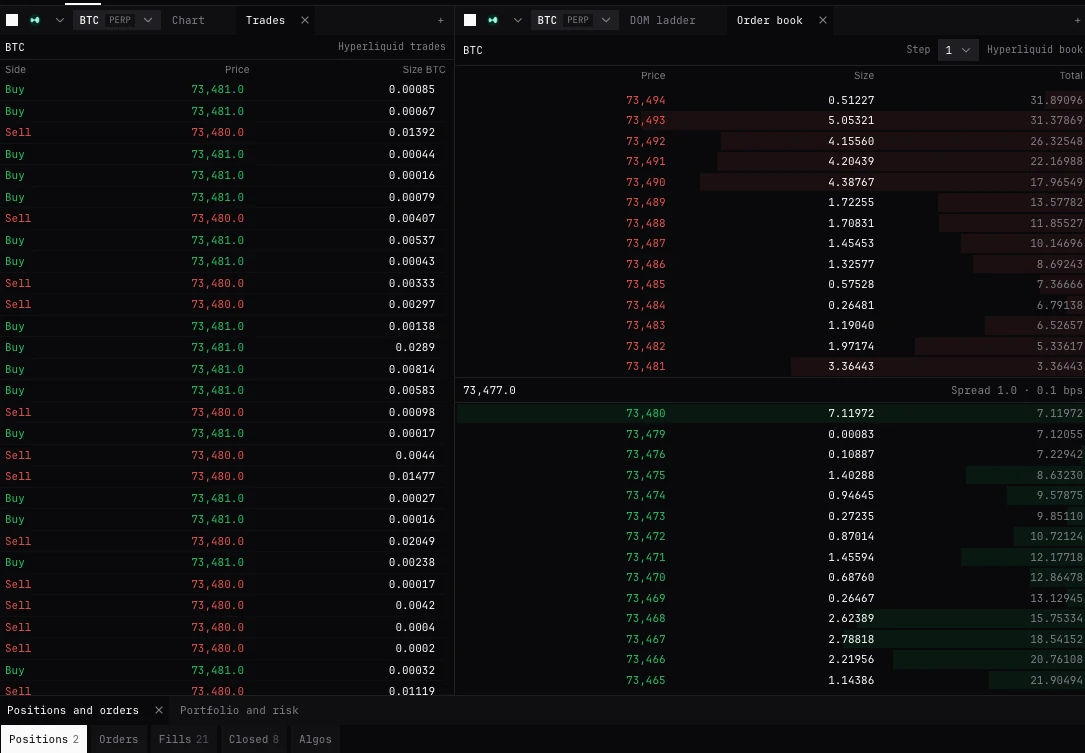
The exchange’s own book and its trades for the panel’s market, from your account’s connection. A click on the book loads a price into the ticket; nothing here sends. New to these words? See New to trading.
XBOOKXTAPETrade page (+ Panel, Order book and Trades) and Pro terminal
What they are for
The order book shows the levels the exchange quotes for the market you trade, asks over bids, with your own working size marked. It is the venue’s book, the one your orders meet, not BackQuant’s aggregate.
Trades lists the exchange’s own prints for that market, newest first, with the aggressor’s side (the side that took liquidity).
Not the market-data panels of the Pro terminal: OB (Order Book) and DOM (Depth of Market) are books for reading, not your account’s book, and TRADES (Big Trades Tape) lists large Hyperliquid prints. None of them trades.
The order book
- Header
- The market, Step, and the exchange’s name as Hyperliquid book. It reads Loading before the first book, Stale in amber when the exchange’s feed stops, and Catching up while a tab back from the background fills in.
- Step
- Groups the levels by 1, 2, 5, 10, 20, 50 or 100 ticks, shown as prices. Default 1 tick: the exchange’s own levels.
- Mine
- Your working size at that level, with an accent edge on the row. The column shows only while you have orders on the levels in view.
- Price, Size
- Each level, asks in red over bids in green. The bar behind each is its size against the largest level on screen.
- Total
- The running size from the touch outward. Shown once the panel is wide enough.
- Middle line
- The mark, and the spread of the exchange’s touch in price and in basis points.
- An empty side
- Nobody selling now or Nobody buying now. The venue shows no depth when both are empty.
Clicking the book
- Click a level
- Loads its price into the ticket. The ticket’s side stays.
- Shift-click
- Takes that level: a buy at an ask, a sell at a bid, into the ticket.
- Hold a key and click
- With the Hold, click the chart hotkeys set and hotkeys on (Trading settings, Hotkeys), the held side comes with the price: a buy or sell limit there, in the ticket.
- Far through the book
- A limit more than two levels or 10 bps through the other side says how many levels it takes at once, as you click.
- Nothing sends
- The book only loads the ticket. To send on a click, use the DOM ladder, armed.
Trades
- Header
- The market and the exchange’s name as Bybit trades. Loading before the first print, Not updating in amber once the feed stops.
- Side
- Buy in green or Sell in red: the side that took liquidity.
- Price, Size
- The print’s price and size, in the market’s size unit.
- How many
- The latest 120, newest at the top. No prints yet before the first.
Before your account is in
- Public while connecting
- On a fresh open, both panels show the market they last showed for that account from the exchange’s live public feed, headed Book, public while connecting and Trades, public while connecting, under the connecting line. The account’s own book and trades take their place once it is in.
- Viewing
- A market chosen from the watchlist on an exchange with no account here shows its public book and trades, headed Book, viewing and Trades, viewing. Nothing there loads the ticket. The ticket offers Connect and the exchange’s name, or Stop viewing; on the Market bar, the x beside the market stops viewing.
By market
- Prediction markets
- The book is one side’s price: Yes on Hyperliquid, Up on Lighter. Prices are read to a tenth of a cent at the finest, and Step goes up to 0.1. An empty side names it: Nobody selling Yes now.
- Options
- The book beside the option chain follows the option you last clicked there.
- Spread
- Always the exchange’s own touch: grouping rounds the levels, not the market.
Questions
Is this the same book as the DOM’s?
Yes, the exchange’s book from your account’s connection. The DOM ladders it with more columns and trades from it; the book panel only loads the ticket.
Why did my click keep the ticket on Sell?
A plain click loads the price and keeps the ticket’s side. Shift-click to take the side the level offers.
Why is the book dimmed?
The exchange’s feed has stopped (Stale) or is catching up. Prices there may be old.
Why does the Mine column come and go?
It shows only while one of your orders sits on a level in view.
More
- DOM ladder. The same book as a ladder you trade from.
- The order ticket. Where a click on the book lands.