


Block RFQ
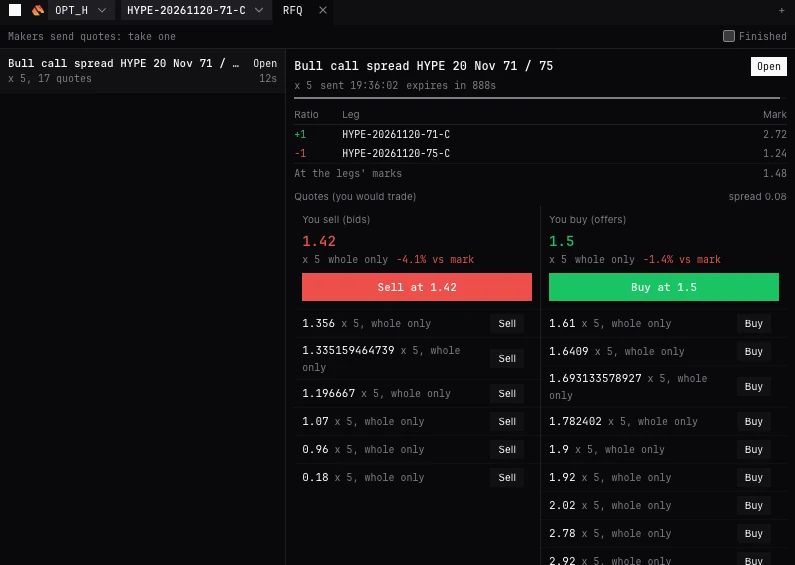
Your block requests and the makers’ quotes on them, live, with each quote read against the legs’ mark. Take one, or cancel the request. On Deribit, Bybit and Derive. New to these words? See New to trading.
RFQTrade page (Options workspace, or + Panel, RFQ) and Pro terminal (EXEC OPTIONS, or RFQ)
What it is for
Trading a structure in size at one price. A request asks the exchange’s makers to quote the whole package; you see every quote and take the one you want. A request does not trade: taking a quote does.
Requests start in the Structures panel (Request block quotes) or the multi-leg ticket (Send to RFQ). This panel follows them.
The panel
- Header
- Makers quote price levels: take at a price (Deribit), or Makers send quotes: take one (Bybit, Derive). Finished, off by default, also lists filled, cancelled, expired and rejected requests.
- Requests
- On the left, newest first, named as a trader names them: Bull call spread BTC 27 Dec 90k / 100k, or 2x before it for a doubled ratio. Each with its state, x its size, how many quotes or levels, and its age.
- States
- Creating, Open, Taking, Cancelling, Filled, Cancelled, Expired, Rejected, or Unknown, reconciling in amber while it is checked with the exchange.
- Detail
- On the right, the selected request: its name and state, x size, sent at, the minimum to trade where the exchange sets one, and expires in with a bar running down.
- Ratio, Leg, Mark
- Each leg with its ratio and live mark, and At the legs’ marks: the package at those marks, where the legs price alike.
- You sell (bids), You buy (offers)
- The board: the best quote large, with its time left (amber under 5 s), its size, the maker’s name where the exchange gives one, whole only where it must be taken whole, and how far it is from the legs’ mark (+1.2% vs mark: positive is better for you). The rest under it, best first, and the spread above.
- Sell at, Buy at
- On the best quote, large: takes it. Sell or Buy on any other line takes that one instead. Each opens the take window.
- Cancel request
- Asks first (Cancel request or Keep), then withdraws it and its quotes. Not until the exchange has opened it.
- Quotes not shown yet
- Where the exchange shows quotes only from a set time, the panel says when, with a countdown.
The take window
- Side, Price, Amount, Total
- What you trade, with the price against the legs’ mark.
- From
- Named quotes: the maker, or a maker.
- Limit price, Amount
- Price levels: take by price, up to the level’s amount at your limit. A level marked all or none must be taken whole.
- If not filled at once
- Price levels: Fill or kill (default) or Rest.
- Named quote
- Takes exactly that quote. If the maker has moved, the exchange refuses it.
- Gone
- If the request is no longer open, the quote has run out of time, or the maker has withdrawn or moved it, the window says so and will not send.
- The button
- Buy 10 at 0.0123, or Sell. Taking trades; it is never retried.
Requesting and taking
- 01Build the structure in Structures, or click its legs in the chain.
- 02Press Request block quotes, or choose Send to RFQ in the ticket and press Request quotes. Read the legs and the units, then Send request.
- 03Watch the quotes arrive on the board, each against the legs’ mark.
- 04Press Buy at or Sell at to take the best quote, or Buy or Sell on any other line; check the take window, and confirm.
- 05The trade arrives as fills of the legs: Traded: the legs are on the Positions tab of Positions and orders. Or press Cancel request to withdraw it.
By exchange
- Each exchange caps the legs in one request: past it the ticket says so before sending.
- On Bybit, the margin note in the panel applies as in the chain: options on Cross or Portfolio Margin.
| Exchange | How makers answer | How you take |
|---|---|---|
| Deribit | Price levels | At your limit, up to the level, Fill or kill or Rest |
| Bybit | Named quotes | Exactly one quote |
| Derive | Named quotes | Exactly one quote |
| OKX | No block RFQ | - |
- How makers answer
- Price levels
- How you take
- At your limit, up to the level, Fill or kill or Rest
- How makers answer
- Named quotes
- How you take
- Exactly one quote
- How makers answer
- Named quotes
- How you take
- Exactly one quote
- How makers answer
- No block RFQ
- How you take
- -
Questions
Did my request trade?
No. A request only asks for quotes. Only taking a quote trades.
Why was my take refused?
A named quote is taken exactly; if the maker moved or withdrew it, the exchange refuses. Take another, or wait for a new one.
What does +0.8% vs mark mean?
The quote is 0.8% better for you than the package at the legs’ marks. Negative is worse.
Why is there no RFQ on my account?
Block RFQ is on Deribit, Bybit and Derive. Elsewhere the panel reads No block RFQ on this account.
Where do I see old requests?
Tick Finished.
More
- Structures and packages. Building the structure to request.
- Buy or sell an option, or a spread. Step by step.