


Depth of Market (market data)
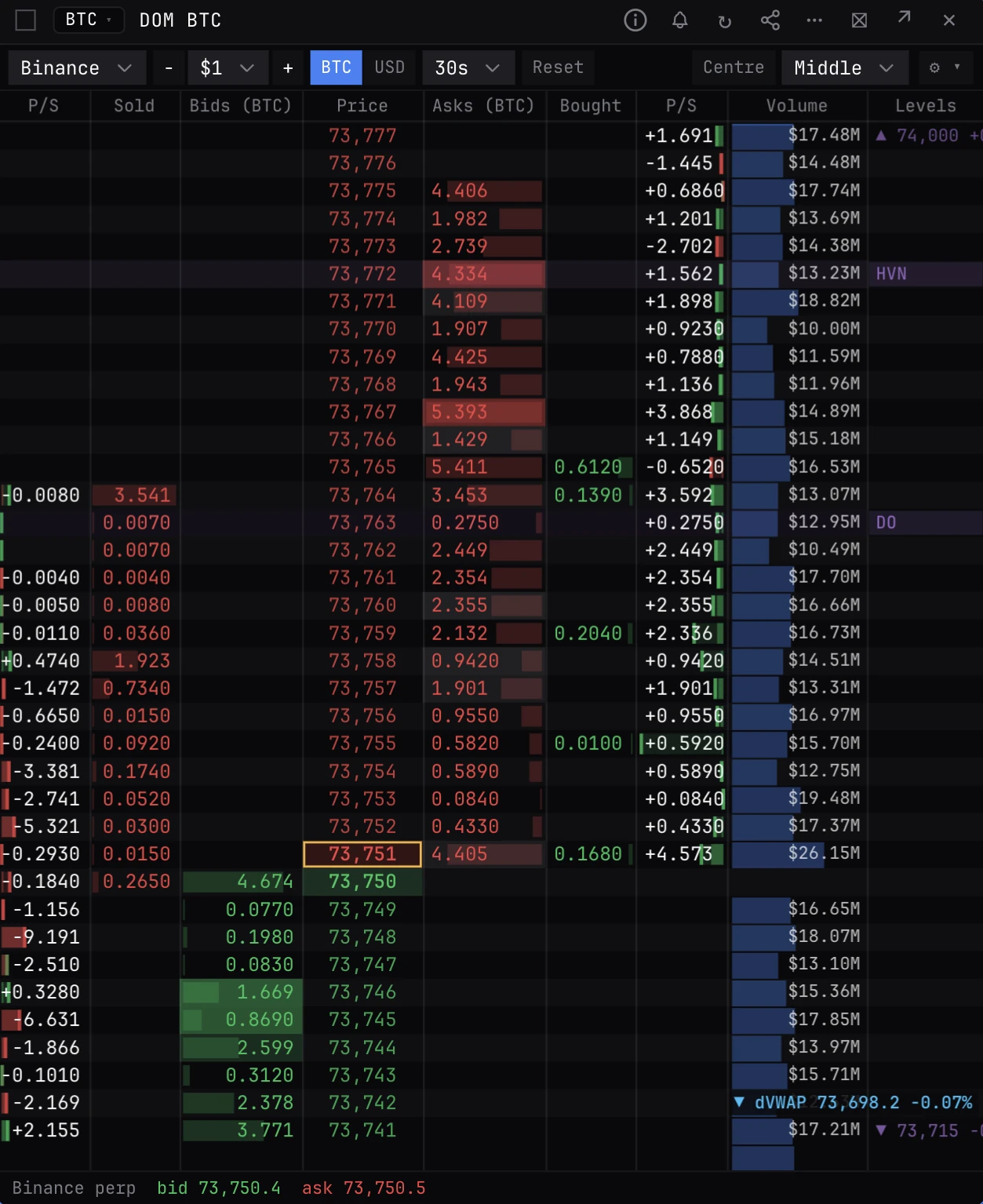
A market-data price ladder: one row per price with the resting bids and asks, the taker selling and buying there, size stacked or pulled, the day's volume and the chart's key levels. It sends no orders: to trade from a ladder, use the DOM ladder (XDOM).
DOMDEPTHBTC and ETH: one perp book (Binance, Bybit, OKX or Hyperliquid), one spot book, the Binance, Bybit and OKX perps summed, the spot books summed, or all of them.
Typing it
DOM[BTC|ETH]group=The columns
- Bids, Price, Asks. Resting size at each price. Best bid and ask are lit, the last trade's row is outlined and big resting orders are filled brighter.
- Sold and Bought. Taker sells (hitting bids) and taker buys (lifting asks) at each price over the window.
- Bid P/S and Ask P/S. Pull and stack: resting size added (plus) or cancelled (minus) over the window. Fills are not counted, so it moves only on orders placed or pulled.
- Volume. The day's traded volume at each price across the perp venues, with the day's VWAP (UTC) as a dashed blue line.
- Levels. The chart's key levels on their rows: dealer positioning, market profile, prior ranges and liquidation clusters.
Sources
- Perps. Binance (the default), Bybit, OKX or Hyperliquid. Aggregated sums the Binance, Bybit and OKX perps; add or drop venues in the settings.
- Spot. Coinbase, Kraken, Bitstamp, Gemini, Binance, Bybit or OKX spot, or Aggregated spot, with the USD books converted at the live USDT rate.
- All (perp + spot). Both lists summed. Perps trade a few basis points away from spot (the basis), so near the price the two books overlap by that much.
What to look for
- Size stacking just ahead of price that holds as it trades into it (absorption), or a wall that vanishes as price gets close (pulled).
- Heavy buying into the asks while Ask P/S stays positive: sellers refilling as fast as they are taken.
- A level on the ladder with real size resting at it, rather than a line on a chart with nothing behind it.
Arguments and controls
- BTC or ETH
- The coin. Left out, your default symbol if it is BTC or ETH, else BTC.
- group=
- Row size in dollars, used when it is one of the ladder's steps (BTC $0.10 to $1,000, ETH $0.01 to $25). Default $1 on BTC, $0.10 on ETH. The minus and plus buttons step it.
- Window
- 10s, 30s (default), 1m or 5m for Sold, Bought and pull/stack. Reset clears them.
- Units
- Sizes in coins (default) or dollars.
- Follow
- Middle (default) recentres once price leaves the middle half, Always keeps it on the centre row, Edge only near an edge. Scrolling stops it; Centre brings it back.
- Settings
- Which column groups show, their widths and order, which key levels draw, the daily VWAP line, and pull/stack as numbers, bars or both.
Good to know
- A row holds its price up to the next one: bids round down, asks round up. On the Aggregated perp book the venues trade a little apart, so the best bid usually sits above the best ask and the rows between hold both.
- Fills the depth feed never showed (hidden or refilled orders) read as stacking in P/S. Read it beside Sold and Bought.
- Free plan: the book is live on both coins. The Volume and Levels columns and the VWAP line show on ETH only; on BTC they are off.
Also on the chart
The same data can sit on the price chart. Press / on the chart and search for:
Pairs well with
Questions
How is DOM different from OB?
OB is one book listed the way an exchange shows it, with exact sizes and a depth chart. DOM is a ladder that adds what traded at each price, what was stacked or pulled, volume and levels, on any venue or several summed.
What is pull and stack?
Resting size added at a price is stacked, size cancelled is pulled. Fills are not counted, so it shows intent to trade, not trading.
Can I place orders from DOM?
No. DOM is market data for BTC and ETH. To trade from a ladder on your own exchange account, use the DOM ladder (XDOM): see the DOM ladder page.