


The order ticket
TICKET (or ORDER) in the Pro terminal, Order ticket on the trade page. It offers only what the account and market support, and its button says exactly what will be sent. New to these words? See New to trading.
TICKETBUYSELLPro terminal and /trade
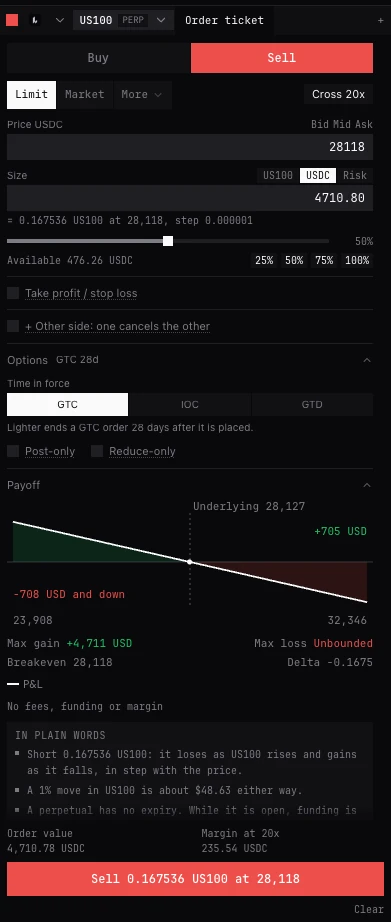
Top to bottom
- Buy / Sell
- The side. Nothing is chosen for you. On a prediction market, the sides by their own names.
- Limit, Market, Market, capped
- The order type. Only the types the account and market allow are shown; Market, capped is Deribit’s.
- More
- Stop / take profit and the algorithms: TWAP, VWAP, POV, Chase, Trailing stop, Iceberg, Grid, Scheduled, Ladder, each where the account offers it, with a line on what it does. The button then shows the one chosen.
- Leverage (Cross 20x)
- Opens the leverage window. On perpetuals and futures, where the exchange sets leverage. While a panel reads it again, the last figure read is shown until the exchange answers.
- Price
- For a limit. Bid, Mid and Ask fill it in. With a side chosen and the price empty, the mid is filled in once. An option’s price can also be typed in dollars or as IV: see The option chain.
- Size
- In the coin, in the quote currency, or by Risk, switched beside the label. See Size below.
- Slider, 25% 50% 75% 100%
- A share of what the account can trade at its leverage. Shown once funds, leverage and a price are known.
- Available
- What the account has free to trade, as the exchange states it now. While it is being read the line says so, and nothing is sized from old figures.
- Take profit / stop loss
- Exits attached to the entry, or watched in this tab where the exchange attaches none. See Stops, exits and hedges.
- + Other side: one cancels the other
- A second entry; the first to fill cancels the other. See Stops, exits and hedges.
- Options
- The order’s settings, folded (not options contracts): Time in force, Post-only, Reduce-only, Self-trade prevention, Show at the venue and Max slippage. Its header sums up what is set, for example GTC · post-only, or none set.
- Payoff
- Folded. What this order makes or loses across prices, on its own or with your book (all your positions in the coin on this account). Not on prediction markets.
- Order value, Margin, Fee
- What the order is worth, the margin it needs at your leverage (not on a reduce-only order, which frees margin), and on Hyperliquid the fee: taker for a market order or a limit at or through the touch, maker otherwise, at your account’s own rates once read, with BackQuant’s fee included where your key carries it.
- The button
- The order in words: Buy 0.5 BTC-PERP at 65,000, with any take profit, stop loss, hedge or second side added. Green for a buy, red for a sell. One press sends one order: a double click, or Enter during a send, sends nothing more.
- Clear
- Empties the size, price and any take profit, stop or hedge. Beside it, where the order came from: From the book, From the chain, From a position, From the chart, From Structures, or Hedge, from Risk (the Hedge in Portfolio risk).
Order types
Limit and Market sit up front; stops and the algorithms are under More. What each does on each exchange, and who holds it, is on Every order type.
- Limit
- Buys or sells at your price or better. What does not fill at once rests on the book until it fills or you cancel it.
- Market
- Fills now against the book, at the best prices there, no worse than the price shown: the live touch plus Max slippage. Where an exchange takes no price cap on a market order (Deribit, Binance), the ticket says so: use a limit to cap it.
- Market, capped
- Deribit. A market order the exchange caps at a protective price it chooses. What does not fill at once is cancelled; nothing rests.
- Stop / take profit
- Waits for a Trigger price, then sends a market order or a limit, as When it fires says. See Stops, exits and hedges.
- Algorithms
- Work an order over time or across prices, run by BackQuant. See Algorithms.
Size
What is sent is always a quantity in the coin, or in the exchange’s contracts, rounded down to the size step. The line under the field shows it.
- Coin
- The quantity itself. The placeholder shows the smallest order.
- Quote currency
- Perpetuals, futures and spot. An amount of money, turned into the coin at the order’s price (the limit, or the touch a market order takes) and rounded down to the step. It follows the price until the order is sent.
- Risk
- What you lose if the stop loss fills at its price: an amount in the quote currency (50), or a share of what is available (1%). The ticket works out the size from the entry and that stop loss, rounded down to the step, and shows it. A buy at 65,000 with the stop at 63,000 loses 2,000 a BTC at the stop, so a risk of 50 reads = 0.025 BTC, loses 50 USDC at 63,000 (3.08% away). The % is the stop’s distance from the entry. Fees and slippage are on top.
- Risk needs a stop
- Shown only where a stop loss can be attached to the order, and not on options. With no stop loss set, Add stop loss turns it on. Only a stop loss that will be sent counts: none goes with a reduce-only order or a pair. Where the stop loss fills as a limit, the worse of its two prices counts.
Leverage
- Margin: Cross
- The whole account backs the position, and a loss can draw on all of it.
- Margin: Isolated
- Only the margin put on this position backs it; it alone can be lost.
- Leverage
- A slider from 1x to the market’s maximum, with 1, 2, 3, 5, 10, 20, 25 and 50x below that maximum, and the maximum itself.
- Set Cross 20x
- Sets it at the exchange for this market and account, for new orders and any position already open. More leverage holds less margin and brings the liquidation price closer. Margin is offered only where the exchange has both.
The Options fold
- GTC
- Good till cancelled: rests until it fills or you cancel it. The default for a limit. Where the exchange ends a resting order anyway, the fold says so and the header shows it (GTC 28d): Lighter after 28 days; Derive after 119 days, or when the account’s session key expires if that is sooner.
- IOC
- Immediate or cancel: fills what it can at once, the rest is cancelled. The default for a market order.
- FOK
- Fill or kill: fills whole at once, or not at all. Not on Hyperliquid or Lighter.
- GTD
- Good till date: rests until it fills or the time you set in Expires. On Derive, Lighter and Binance futures; the bounds each takes show under the field, and a time outside them is refused before sending.
- Post-only
- Only rests on the book: refused if it would fill at once, so it never pays the taker fee. Resting limits only. Not offered for TWAP, VWAP, POV or Trailing stop.
- Reduce-only
- Can only shrink or close a position, never open one or turn it the other way. Shown where the exchange takes it. On Derive a reduce-only order must fill at once: IOC or FOK.
- Self-trade prevention
- Where the exchange takes it per order (Binance, OKX, RISEx): what happens if this order would trade against one of your own resting orders. Venue default, Cancel my resting order, Cancel this order or Cancel both. With Venue default, the exchange’s own rule is said under it.
- Show at the venue
- On a limit, where the exchange has its own iceberg (Binance spot): it shows only this much of the order at a time, and more as it fills. Empty shows all of it.
- Max slippage bps
- Market orders. How far past the current price it may fill: 100 bps is 1%. Default 200, a whole number from 1 to 500. The worst price is shown beside it (a buy with the ask at 65,000: no worse than 66,300), or no price cap on Deribit and Binance: use a limit there.
- Stop if prices are older than (ms)
- Algorithms only. Default 5000. See Algorithms.
Before it sends
- The line above the button says why the order cannot go yet: no side, a size under the minimum, a price off the tick, not enough margin, reduce-only with no position to reduce. A problem with one field shows under that field.
- A limit, or Market, capped, priced more than 2% through the touch asks you to confirm: the button turns amber and says Confirm, and the question lapses after 10 seconds. More than 10% through, it is not sent: check the price. A stop or take profit that would fire at once also asks.
- The ticket asks before the first order each session on each account, naming the account and exchange: BackQuant cannot undo an order once the exchange has it. In Trading settings, Confirm real-money orders: First order each session (the default), Every order, or Never. Don’t ask again in the question sets Never.
- If the exchange is still being asked about an earlier order’s outcome, the ticket says so above the button and the order waits for that answer.
- If Auto-hedge keeps this coin on the account, the ticket warns that the hedger will offset the trade.
- After you send. Sending, then Accepted or the exchange’s refusal (refused for want of funds, it says where the money likely is), then the order’s state: Working, Part filled, Filled, Cancelled, with the exchange’s reason.
- Outcome unknown. The order may or may not have reached the exchange. The ticket locks until you check the Orders tab of Positions and orders and press I have checked. New order.
BUY and SELL
Type them anywhere in the Pro terminal with a trading desk open. They load the trading desk’s ticket and send nothing: check the order and send it from there. LONG and SHORT do the same; ORDER opens a ticket, as TICKET does.
- BUY 0.5 BTC 81K
- A buy limit of 0.5 BTC at 81,000.
- SELL 2 ETH MKT
- A market sell of 2 ETH.
- BUY $1000 ETH 2400
- A buy of $1,000 of ETH at 2,400, converted to ETH at that price.
- BUY 0.1
- A buy of 0.1 on the trading desk’s market, at the mid.
- Numbers
- 81k is 81,000, 1.2m is 1,200,000; commas are fine. A dollar size with no price works only on the trading desk’s own market.
Questions
Why is an order type or option missing?
The ticket shows only what this account and market take. Hyperliquid and Lighter have no FOK, GTD is on Derive, Lighter and Binance futures only, an option on Deribit, Bybit or OKX takes no exchange stop, and a prediction market takes only Limit or Market. Every order type has the full table.
Why will the button not send?
The line above it, or the field itself, says what is missing or wrong. Fix that and the button names the order again.
Does 100% on the slider use everything?
It sizes the order to all the account can trade at the leverage set, from what the exchange says is available now, rounded down to the size step.
Can I size an option in dollars or by risk?
No. Dollars work on perpetuals, futures and spot; Risk needs a stop loss attached and is not offered on options. Size an option in the exchange’s own units.
What does Outcome unknown mean?
BackQuant could not learn whether the exchange took the order. It sends nothing more from the ticket until you have looked at Orders and pressed I have checked. New order, so the same order is never sent twice by mistake.
More
- Place your first trade. The ticket, step by step.
- Every order type. What each order does on each exchange.
- Trading settings. Order confirmations.