


Algorithms
In the ticket under More. Each works your order over time or across prices, and shows only its own settings. They run in BackQuant, on every exchange, not at the exchange. New to these words? See New to trading.
TICKETThe ticket, under More
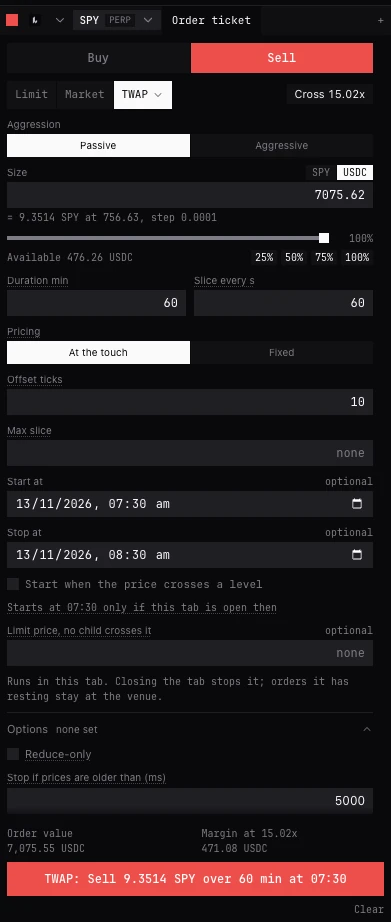
At a glance
| Algorithm | What it does | Use it to |
|---|---|---|
| TWAP | Even slices over a set time | Trade size steadily over minutes or hours |
| VWAP | Slices shaped by the usual volume | Track the day’s average price |
| POV | A share of what trades, as it trades | Keep a small footprint in live volume |
| Chase | A limit that follows the touch | Get maker fills without being left behind |
| Trailing stop | A stop that follows the price | Keep most of a move as it runs |
| Iceberg | Shows a slice, hides the rest | Hide size on the book |
| Grid | A grid of resting orders | Work a range, refilling levels |
| Ladder | Orders spread across a range | Scale in or out across prices |
| Scheduled | One limit at a time or a price | Place an order later, at a level |
- What it does
- Even slices over a set time
- Use it to
- Trade size steadily over minutes or hours
- What it does
- Slices shaped by the usual volume
- Use it to
- Track the day’s average price
- What it does
- A share of what trades, as it trades
- Use it to
- Keep a small footprint in live volume
- What it does
- A limit that follows the touch
- Use it to
- Get maker fills without being left behind
- What it does
- A stop that follows the price
- Use it to
- Keep most of a move as it runs
- What it does
- Shows a slice, hides the rest
- Use it to
- Hide size on the book
- What it does
- A grid of resting orders
- Use it to
- Work a range, refilling levels
- What it does
- Orders spread across a range
- Use it to
- Scale in or out across prices
- What it does
- One limit at a time or a price
- Use it to
- Place an order later, at a level
Where they run
- The algorithms run in BackQuant’s trading engine in your browser, not at the exchange: the exchange sees only the orders they send. Every BackQuant tab in the browser shares that engine, so closing one tab while another stays open does not stop them. While this browser runs work for an account, the market bar and the trade page footer show Keep tab open.
- If the last BackQuant tab closes, the engine stops 15 seconds later and nothing works them. Closing or reloading that tab asks first. When BackQuant opens again, an algorithm that was running comes back paused, under Algos: resume it or cancel it. One still waiting for its start time or its price is cancelled, having sent nothing. Orders already resting at the exchange stay there.
- If the browser does not run the engine for more than 5 seconds (the computer asleep, the tab frozen), TWAP, VWAP and POV pause rather than catch up, and wait for you to resume them.
- Each is offered on every exchange BackQuant trades, on perpetuals, futures, spot and options, wherever the account and market support it; not on prediction markets. Running ones are in Positions and orders, under Algos.
- Reduce-only in the Options fold applies to an algorithm too: every order it sends then only reduces the position.
Settings they share
- Aggression
- TWAP, VWAP and POV. Passive: each order rests post-only at your side of the book (the bid when buying) and waits to be filled; no spread paid, but it can fall behind. Aggressive: each order takes from the other side (the ask when buying), immediate or cancel, and what does not fill stays due; it keeps to time and pays the spread. Default Passive.
- Pricing, for TWAP, VWAP and POV
- At the touch (Passive) or At the far side (Aggressive), offset by ticks, or Fixed at the price you set. The button is named for the side Aggression chose. A passive POV order that rests follows the touch, at most once a second.
- Peg / Fixed, for Chase, Iceberg and Grid
- Peg prices from the Reference you choose, offset by ticks. Chase moves its order as that price moves. Iceberg prices each slice as it is placed, then the slice rests where it was placed. Grid takes its price once, when it starts; every level, refills included, keeps to it. Fixed: at the price you set. Default Peg.
- Reference
- What a peg is priced from. Touch: your side’s best price (the bid when buying). Far: the other side’s (the ask when buying). Mid: halfway between. Bid, Ask. Mark: the exchange’s fair price. Last: the last trade. Default Touch.
- Offset ticks
- Ticks from the price it follows. Positive is more aggressive: closer to filling. Default 0.
- Start at, Stop at
- Optional times; POV needs a Stop at. A start must be in the future and within 24 hours, and happens only if BackQuant is open in this browser then. At its stop time it stops with what it has filled.
- Start when the price crosses a level
- Waits for a price: Mark, Last, Index, Mid, Bid or Ask that Rises to the level or Falls to the level, on this account or another account open in BackQuant (choose the instrument there). It starts once. If it is already there: Refuse (default) sends nothing, Start now starts at once. Not for VWAP.
- A limit with a level
- The market can move through the level before it acts, so a start on a price needs a Limit price, unless the order is reduce-only, a Grid, Ladder or Scheduled, or priced Fixed.
- Limit price, no child crosses it
- No order it sends is priced past this. Optional. Not for Scheduled or Ladder, which set their own prices.
- Stop if prices are older than (ms)
- In the Options fold. It acts only on prices fresher than this, and waits while they are older. Default 5000.
TWAP
Even slices over a set time. Use it to buy or sell more than the book holds at once, at a steady pace, when the time it takes matters more than the volume pattern.
- Duration min
- How long the whole order runs. Default 10.
- Slice every s
- Time between slices: the size is split evenly over the duration. No longer than the duration. Default 30.
- Pricing
- At the touch or At the far side, by Aggression, offset by ticks; or Fixed.
- Max slice
- The largest single order it sends (VWAP and POV call it Max child). Empty: no cap.
VWAP
Slices that follow the day’s volume, so more trades when the market usually trades more. Use it to come close to the volume-weighted average price over the hours it runs. Before you send, it reads the exchange’s volume history and shows the schedule: a bar for each slice, how many, from when to when. It cannot wait for a price: its curve is for the hours it runs.
- Duration min
- Whole minutes, up to 1440. Default 60.
- Slice every min
- Each slice is sized to the volume that usually trades then. Must divide the duration. Default 5.
- Days of history
- How many past days of volume shape the curve, 1 to 30. Default 7.
- Pricing
- At the touch or At the far side, by Aggression, offset by ticks; or Fixed.
- Max child
- The largest single order it sends. Empty: no cap.
- Max % of volume
- The most of the market’s volume since it began that it may have filled, up to 50. Empty: no cap.
POV
A share of what trades, as it trades, counted from the trades that print on the exchange after it starts. Never ahead of the market, one order at a time. Use it to stay a small part of the flow, however busy the market turns out to be. It needs a Stop at time, and stops then with what it has filled.
- Rate % of volume
- Its share of what the market trades: 10 sends about a tenth of the volume. Above 0, up to 50. Default 10.
- Pause after gap s
- If the market’s volume cannot be counted for this long, it pauses. Default 30.
- Pricing
- At the touch or At the far side, by Aggression, offset by ticks; or Fixed, which stays where it is set.
- Max child, Min child
- The largest and smallest order it sends. Less than the minimum waits until more is due, except the last.
Chase
A limit that follows the touch. Use it to be filled as a maker without watching the book, or, with Then cross after, to be sure of a fill within a time.
- Pegged to
- Peg or Fixed, the reference and the offset.
- Reprice every ms
- Moves its order no more often than this, at least 250. Default 1000.
- Max distance ticks
- Stops following once the price is this many ticks from where it started. Empty: no limit.
- Min move ticks
- Ignores moves smaller than this, so it does not reprice on a flicker. Empty: any move.
- Then cross after s
- If not filled by then, its order is withdrawn and what is left is sent once at the far price plus the slip, never past your limit. What that does not fill is left unfilled. Empty: never.
- Crossing slip ticks
- Shown once Then cross after is set. How far past the far price that one order may go. Default 2.
- If prices go stale
- Hold leaves its order where it is; Cancel working pulls it until prices update. Default Hold.
Trailing stop
A stop that follows the price. It is worked by BackQuant’s engine, not held at the exchange, on every exchange. Use it to keep most of a move while it runs, accepting that it is watched only while BackQuant is open.
- Trails
- The price the stop follows, from the Reference list. Default Touch.
- Trail by
- bps (a share of the price: 100 is 1%) or Price (a fixed amount), set in Trail bps or Trail amount. Default 50 bps.
- Activate at
- Starts trailing only once the price reaches this: at or above it for a sell stop, at or below it for a buy stop. Empty: at once.
- On trigger
- IOC: an order at the far price plus Slippage ticks, immediate or cancel. Rest: a limit at the far price plus Offset ticks, left resting. Default IOC, 2 ticks.
- Attempts
- The most orders it sends after it fires, if one does not fill; it ends when they are used. Default 3.
Iceberg
Shows a slice, hides the rest. Use it so a large resting order does not show its size. For the exchange’s own iceberg on a plain limit (Binance spot), use Show at the venue in the Options fold.
- Pricing
- Peg or Fixed. A pegged slice is priced as it is placed, then rests there.
- Visible size
- How much shows on the book at a time, no more than the order; the rest stays hidden and refills it.
- Variance
- Varies each shown slice by up to this much either way, in whole size steps, in a fixed pattern for this order rather than at random, and never below the exchange’s smallest order. Empty: none.
Grid
A grid of resting orders, each further from the market than the last. Use it to work a range, with filled levels put back if you choose.
- Ladder starts
- Where the grid’s first order sits, pegged or fixed (the label says ladder, but this is the Grid’s own setting, not the Ladder algorithm). A peg is taken once, when the grid starts.
- Levels
- How many orders in the grid, up to 64. Default 5.
- Spacing ticks
- Ticks between neighbouring orders, each further from the market than the last. Default 2.
- Per level
- The size of each order.
- Replace a level once it fills
- Puts a filled order back at its price. Off by default; then, once every level has been placed and none is working, the grid ends.
Ladder
Orders spread across a range. Use it to scale into or out of a position across prices you choose. Before you send it lists every order, price and size, as the engine will place them, and draws them on the chart.
- First price, Last price
- The range.
- Levels
- How many orders across it, 2 to 64. Default 5.
- Sizes
- Even: the same at every price. Linear: changes by the same amount from first to last. Geometric: by the same factor. Default Even.
- Last level over first, in size
- 2 makes the last order twice the first. Default 2. Not for Even.
- Place a filled level again
- Off by default.
Scheduled
One limit order placed at a time or when a price is reached: set Start at, or Start when the price crosses a level. Use it to place an order later without sitting at the screen, as long as BackQuant stays open.
- Price
- The limit price.
- Time in force
- GTC (default) or IOC.
Questions
Does the exchange see my algorithm?
No. It sees only the ordinary orders the algorithm sends, one or a few at a time.
What if my computer sleeps?
If the engine has not run for more than 5 seconds, TWAP, VWAP and POV pause instead of catching up, and wait for you to resume them. If the last BackQuant tab closed, running algorithms come back paused under Algos when BackQuant opens again.
Why is Post-only missing on TWAP?
TWAP, VWAP and POV set it themselves: Passive rests every order post-only; Aggressive takes. Trailing stop fires to fill, so post-only does not apply.
Can an algorithm close a position?
Yes. Tick Reduce-only in the Options fold, or use Close by chase... or Close by TWAP... in a position’s Close menu, which load the close ready to check.
Is the trailing stop the exchange’s own?
No, it is BackQuant’s, on every exchange. Bybit also holds a trailing stop on a whole position, set in Positions and orders.
More
- Work a big order. Step by step.
- How the algorithms work. How each one prices, slices and recovers.