


Stops, exits and hedges
A stop or take profit on its own, exits attached to an entry, two entries where one cancels the other, a stop moved to breakeven, closes worked by an algorithm, Reverse, and an option’s delta hedged as it fills. This is the one place for which exits each exchange holds. New to these words? See New to trading.
TICKETThe ticket, Positions and orders, the Actions menu
Which exits outlive BackQuant
An exit held by the exchange works with BackQuant closed. One held by BackQuant is watched only while a BackQuant tab is open in this browser.
| Exit | Held by | With BackQuant closed |
|---|---|---|
| Stop / take profit, where the exchange takes stops on that market (see Every order type) | The exchange | Works |
| Reduce-only stop on Derive | BackQuant | Not watched |
| TP / SL with the entry: Bybit, Deribit, Lighter, OKX | The exchange | Works |
| TP / SL with the entry: Hyperliquid | The exchange, once the entry fills whole | Works once placed |
| TP / SL with the entry: Binance futures, RISEx | Placed by BackQuant as the entry fills | Placed when a tab next opens |
| TP / SL watched in this tab | Take profit at the exchange, stop in BackQuant | Take profit stays, stop gone |
| One cancels the other | BackQuant | Resting side stays alone |
| Trailing stop | BackQuant | Not watched |
| Stop at breakeven | The exchange (BackQuant on Derive) | Works, not on Derive |
| Hedge on fill, Auto-hedge | BackQuant | Stopped |
- Held by
- The exchange
- With BackQuant closed
- Works
- Held by
- BackQuant
- With BackQuant closed
- Not watched
- Held by
- The exchange
- With BackQuant closed
- Works
- Held by
- The exchange, once the entry fills whole
- With BackQuant closed
- Works once placed
- Held by
- Placed by BackQuant as the entry fills
- With BackQuant closed
- Placed when a tab next opens
- Held by
- Take profit at the exchange, stop in BackQuant
- With BackQuant closed
- Take profit stays, stop gone
- Held by
- BackQuant
- With BackQuant closed
- Resting side stays alone
- Held by
- BackQuant
- With BackQuant closed
- Not watched
- Held by
- The exchange (BackQuant on Derive)
- With BackQuant closed
- Works, not on Derive
- Held by
- BackQuant
- With BackQuant closed
- Stopped
Stop / take profit
Under More in the ticket. Choosing it turns Reduce-only on where the exchange supports it; going back to a plain order turns it off again. Where each exchange holds stops, and on what, is on Every order type.
- Purpose
- Stop loss or Take profit. Default Stop loss.
- When it fires
- What it sends once the trigger is reached: Market, or Limit at the price you set, as the exchange offers. Derive fires as a limit only.
- Trigger
- The price that sets it off.
- Limit
- When it fires as a limit: a sell at or below the trigger, a buy at or above, or it would not fill.
- On price
- The prices the exchange triggers on. Mark: the exchange’s fair price, the one it liquidates on, slow to jump on a single trade. Last: the last trade, so a brief wick can set it off. Index: the spot price across exchanges. Default Mark.
- Time in force
- GTC, or GTD on Derive.
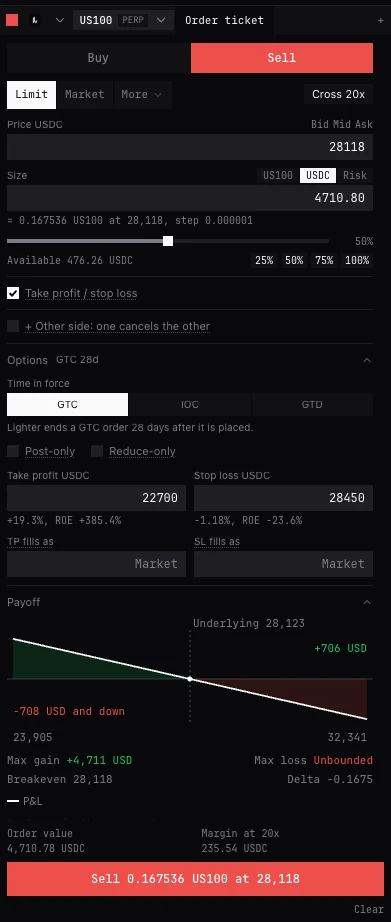
Take profit / stop loss on the entry
A switch under the order, for a Limit or Market entry where the exchange takes exits with an entry (not on options). Not on a reduce-only order. They close what the entry opens and are cancelled with it.
- Take profit, Stop loss
- Set either or both: on a buy, a take profit above the entry and a stop loss below; on a sell, the other way. Each shows the move from the entry, and the return on margin at the leverage set for the market.
- TP fills as, SL fills as
- Empty: a market order when it fires. A price: a limit at that price, within 10% of its trigger. A stop loss’s limit must be at or below its trigger on a long, at or above on a short.
- Bybit, Deribit, Lighter, OKX
- The exchange holds them with the entry and places them as it fills.
- Hyperliquid
- Hyperliquid places them once the whole order fills. Until then, while a BackQuant tab is open, the filled part of a resting order gets a stop loss from BackQuant (not if you already held a position that way). If the order ends part filled, BackQuant places both for that part.
- Binance futures, RISEx
- The exchange takes none with an entry: the BackQuant tab trading the account places them as it fills. With no BackQuant tab open then, they are placed when one next opens. The ticket says to keep a tab open.
Take profit / stop loss, watched in this tab
Where the exchange attaches no exits to an entry: on Derive, on options, and on spot on Hyperliquid, Lighter, OKX and Binance. Both are set, and the entry is a resting limit or an algorithm that starts now. The take profit rests at the exchange for what has filled, only ever reducing. The stop is watched by BackQuant: when its price is reached, what is left of the entry is withdrawn and what was entered is closed at once, no worse than its worst price. Not with Hedge on fill. The label says this tab, but the stop is watched by BackQuant’s engine, which every BackQuant tab in this browser shares: it is watched while any of them is open, and gone once the last one closes (the take profit stays at the exchange).
- Take profit
- The resting exit price.
- Stop price
- Which price is watched: Mark (default), Last, Index, or the book’s Mid, Bid or Ask.
- Stop when it falls to / rises to
- The stop level.
- Stop no worse than
- The worst price the stop’s order may fill at.
Take profit / stop... on a position
In a position’s ⋯ menu, for a position the exchange can hold no stop for that still takes a resting reduce-only order, such as an option on Deribit or Bybit (not OKX options, which take no reduce-only order): a take profit resting at the exchange, reduce-only, and a stop watched by BackQuant, while any BackQuant tab in this browser is open, that fires as one immediate reduce-only order no worse than its worst price. Set either or both; with both they are linked, and one cancels the other. Where the exchange holds stops on the whole position, Positions and orders sets those instead (TP / SL at the exchange).
+ Other side: one cancels the other
One cancels the other (OCO). Under the order in the ticket, for a GTC Limit, or a Stop / take profit that fires as a limit, that is not reduce-only or post-only. The order above is side A. Side B opens below it as A’s opposite, mirrored about the mark at the same size, and stays as set: it does not move with the market. One press places both, and the first to fill cancels the other.
- Side B
- Buy or Sell. Stop: sent as a limit once its Trigger is reached, no worse than its limit (a buy stop above the market, a sell stop below). Limit: waits at its Price (a buy below the market, a sell above). Its Size follows A’s until you type one.
- A take profit, A stop loss, B take profit, B stop loss
- Each side’s own exits, optional, closing what that side opens. Not on Derive or Binance spot, which say why.
- How it works
- At most one side rests at the exchange; the other is watched by BackQuant. When the watched side’s price is reached, the resting side is cancelled first, and the watched side is sent once that cancel has settled. Where neither side can rest, both are watched and nothing rests until one is reached. The note under the fields says which side rests.
- In Positions and orders
- One row for the pair, with each side’s state beneath and Cancel both. On the chart, the two sides and their exits are linked lines; a watched side is dashed.
- If BackQuant closes
- The pair ends with the engine that watched it. When BackQuant opens again, a side resting at the exchange stays there as a plain order, paused under Algos: resume it to keep it alone, or cancel it. A side only watched is cancelled, having sent nothing.
Stop at breakeven
In Positions and orders, on a perpetual or future, the Close menu: Stop at breakeven, and Stop at breakeven, every position when more than one is open; or the Stop loss to breakeven hotkey, for the market you last clicked. It puts the stop loss at the entry price, on the tick toward profit, so the trade can no longer turn into a loss, fees and slippage aside. One confirmation covers every position it changes.
- Only once the position is in profit, with room: on a live price, the price the stop watches must be past the entry by at least two ticks or 0.05%, whichever is more.
- Where the exchange holds a stop on the position itself (Hyperliquid, Bybit, OKX, Binance futures), that stop is moved to the entry. Elsewhere a reduce-only stop for the whole size is placed, and your own fixed stops short of the entry are cancelled once it is placed. Stops attached to an entry, trailing stops, and stops past the entry stay as they are.
- It never loosens: a stop already at or past the entry is left alone, and it says so.
Close by chase or TWAP
In the same Close menu, where the account offers the algorithm: Close by chase... and Close by TWAP... load a close of the whole position into the ticket, reduce-only where the exchange takes it, with the algorithm’s default settings. Check it and start it there. Chase closes as a maker at the touch; TWAP closes in slices over a time you set.
Reverse at market
In the same Close menu, on a perpetual or future where the exchange takes reduce-only orders; also Reverse on an armed DOM or trade pad, and Shift+R. The position closed at market, reduce-only, then the same size the other way at market once that close has filled whole and the position shows flat: long 3 becomes short 3. From the Close menu it asks first (Reverse at market or Keep); armed, the DOM sends at once.
- Nothing is opened if the close fills only in part, is held until the account is ready, has an unknown outcome, or has not shown filled and flat within 15 seconds; or if the price is not live when it would open. It says which, and what to do.
- It does not start while an algorithm or Auto-hedge trades that market, or while an order on the closing side is not reduce-only (it would add to the new position): stop or cancel it first. It also stops if the position changed since you asked.
- One reverse of a position at a time, across every tab and window of this browser. Your stops and take profits are not changed.
Hedge on fill
For an option worked by an algorithm. As the option fills, its delta is hedged in a perpetual, future or spot pair of the same coin, at the delta the exchange states when it starts. It follows the fills, never ahead of them, and is not recomputed as delta moves. If the hedge cannot fill it stops and says how much delta is left; the option is not unwound.
- Hedge on
- This account, or another account open in BackQuant.
- What it hedges
- On another account: This option, its fills only. Where that account is on Hyperliquid or Deribit, also The whole book: the ticket then sends the option alone, and you start Auto-hedge on that account with this one ticked under Counting this account and.
- Buy to hedge / Sell to hedge
- The instrument it trades, perpetuals first.
- No worse than
- The worst price the hedge may trade at.
- Cross after s
- The hedge rests at the touch this long, then takes from the book once, no worse than the price above. Default 10; empty never.
- Above the button
- Buy (or Sell) up to so much of the hedge, and the exchange’s delta with the time it was read, asked again every 5 seconds. The option cannot be sent without it.
- On another account
- Two separate orders: the option starts first, then its hedge. If the hedge is refused, the ticket says the option is working unhedged, with Cancel the option. That account must be held by this browser through BackQuant’s one-device check (see How the engine works), or nothing is sent.
Auto-hedge
Auto-hedge keeps one coin’s whole book near a delta target by trading a perpetual, future or spot market on a Hyperliquid or Deribit account, counting your other accounts if you tick them. It runs in BackQuant’s engine in your browser and stops when the engine does. Its own pages: Auto-hedge: keep a coin neutral (to start one, step by step) and How Auto-hedge works (every setting, its defaults, and what holds, pauses and stops it).
Good to know
- On Derive a reduce-only stop is watched by BackQuant, and fires only while it runs. Untick Reduce-only to have Derive hold it; the ticket then warns that if the position closes elsewhere first, that stop opens a new one.
- Exits watched by BackQuant stop being watched when its engine stops, 15 seconds after the last BackQuant tab in this browser closes. A take profit already at the exchange stays there.
- Where the exchange holds a stop off the book until it fires, the ticket says so.
Questions
Should I attach exits to the entry or add a stop later?
Attach them where the exchange holds them with the entry (Bybit, Deribit, Lighter, OKX): they are in place from the first fill and cancelled with the entry. A separate Stop / take profit works too, reduce-only, but covers only what you size it to.
Why does the ticket tell me to keep a tab open?
On Binance futures and RISEx, BackQuant places the exits as the entry fills, and on Hyperliquid it keeps a stop on a part filled entry until the whole fills. Those steps need BackQuant running in this browser.
Why is Take profit / stop loss greyed?
It is not offered on a reduce-only order, which only closes. Untick Reduce-only, or set a separate Stop / take profit.
Can Auto-hedge run with BackQuant closed?
No. It runs in BackQuant’s engine in your browser. If the engine stops, Auto-hedge stops and does not restart by itself; BackQuant tells you when you next open it.
More
- Set a stop and take profit. Step by step.
- How exits, closes and rolls work. What the engine does with each exit and close.
- Positions and orders. The Close menu and TP / SL at the exchange.