


Trading settings
Settings, at the top of the trade page and the portfolio page.
Trade and portfolio pages, top right; in the Pro terminal, Settings, Trading
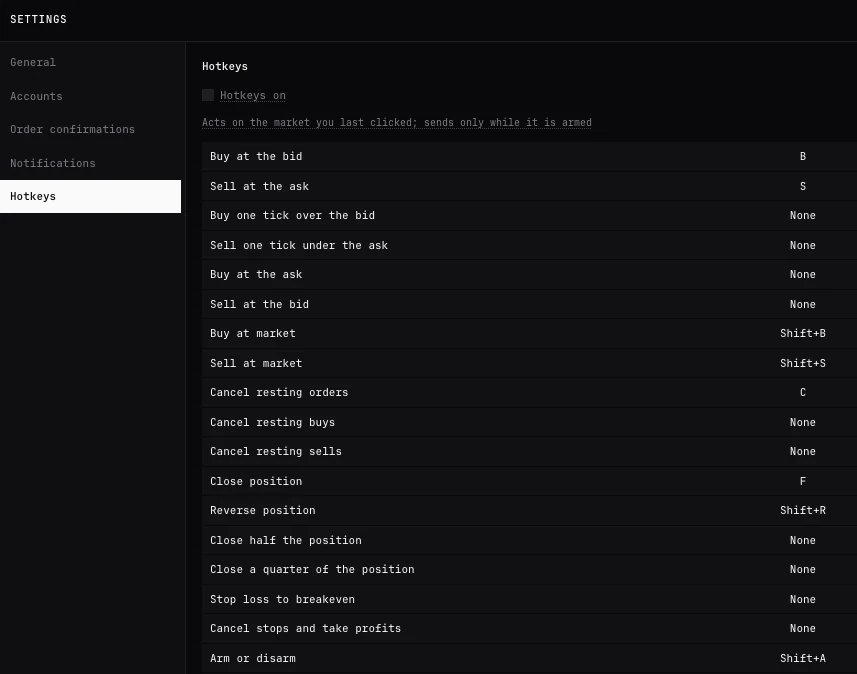
Every setting
| Section | Setting | Choices | Default |
|---|---|---|---|
| General | Theme | Dark, Light, System | The terminal’s |
| General | Hide amounts | Off, On | Off |
| Order confirmations | Confirm real-money orders | First order each session, Every order, Never | First order each session |
| Notifications | When an order fills | Off, On | On |
| Notifications | With a sound | Off, On | Off |
| Notifications | As a browser notification | Allow | Off until allowed |
| Hotkeys | Hotkeys on, each key | Keys of your own, Reset keys | Off |
General
- Setting
- Theme
- Choices
- Dark, Light, System
- Default
- The terminal’s
General
- Setting
- Hide amounts
- Choices
- Off, On
- Default
- Off
Order confirmations
- Setting
- Confirm real-money orders
- Choices
- First order each session, Every order, Never
- Default
- First order each session
Notifications
- Setting
- When an order fills
- Choices
- Off, On
- Default
- On
Notifications
- Setting
- With a sound
- Choices
- Off, On
- Default
- Off
Notifications
- Setting
- As a browser notification
- Choices
- Allow
- Default
- Off until allowed
Hotkeys
- Setting
- Hotkeys on, each key
- Choices
- Keys of your own, Reset keys
- Default
- Off
Sections
- General: Theme
- Dark, Light or System, which follows your device’s light or dark setting. The Pro terminal uses the same theme.
- General: Hide amounts
- Sizes, balances and profit hidden on screen, for sharing it. The portfolio’s charts hide the amounts on their axes and tooltips too.
- Accounts
- Your exchange accounts and their keys, as in Accounts. See Exchange accounts and keys.
- Order confirmations
- When an order asks before it is sent from the ticket. Don’t ask again in the confirmation sets Never. Arming one-click trading on the DOM or the chart always asks.
- Notifications
- When an order fills: a line in the terminal as each of your orders fills; With a sound, a short sound with it; As a browser notification, shown even with the terminal in the background. Where the browser blocks notifications from BackQuant, it says to allow them in its site settings.
- Hotkeys
- Hotkeys on, each key, and Reset keys. Every key is listed on DOM ladder.
In the Pro terminal
In the Pro terminal’s Settings, order confirmations, notifications and hotkeys are under Trading, and your accounts under Execution. Both places set the same.
Questions
Do settings follow me to another device?
No. They are kept in this browser, as your keys are.
Does Never turn off the confirmation for closes?
Never applies to orders sent from the ticket. A close at market from Positions and orders, a reverse and a stop at breakeven ask on their own, and arming one-click trading always asks.
Why do risk alerts not follow the fill sound?
Risk alerts have their own Sound switch, in Risk, Alerts.
More
- Exchange accounts and keys. The Accounts section in full.
- DOM ladder. Every hotkey.
- Portfolio risk. Risk alerts and their sound.