


All your accounts in one place
Options, futures, perps, spot and prediction markets, on eight exchanges (Binance spot connects with a key of its own), every account you connect: one book, in US dollars. This page is the overview; every figure is explained on Portfolio.
PORTTRADEACCOUNTSPortfolio page, trade page and Pro terminal
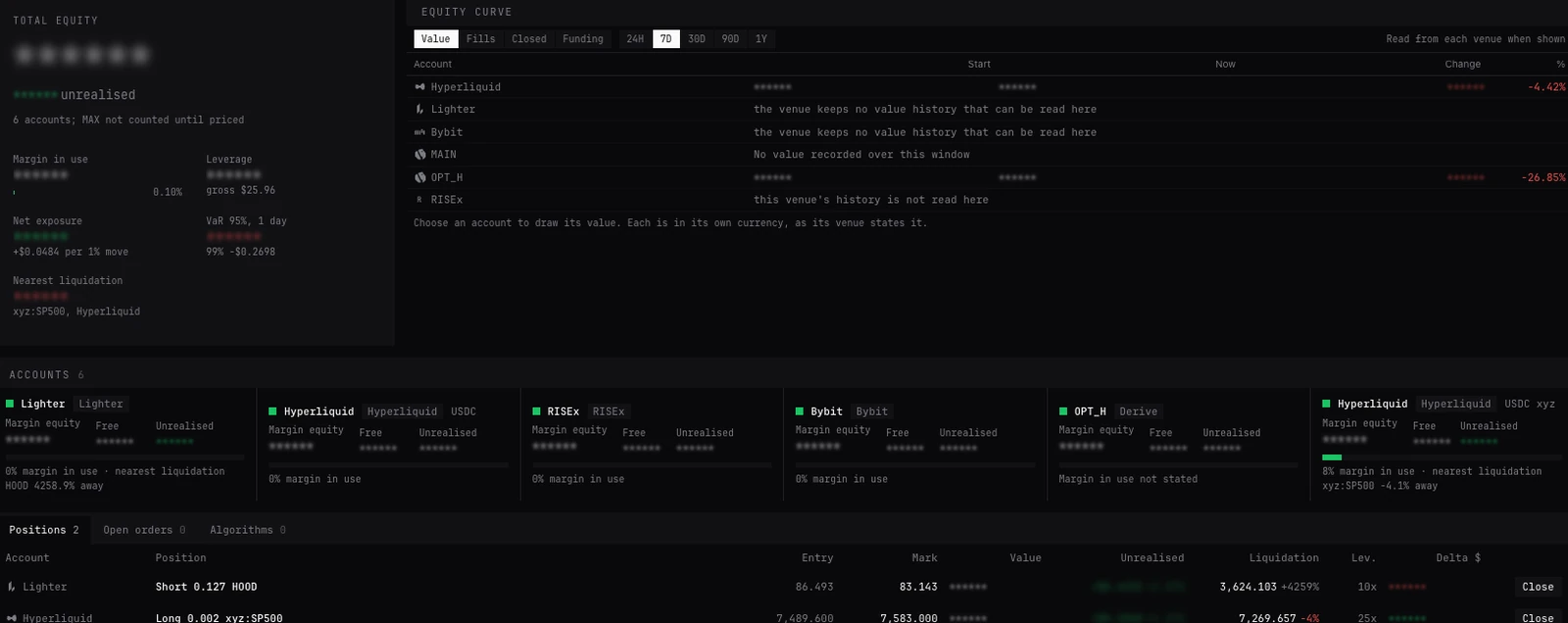
Every exchange, every market
Each account is connected once, by wallet or by API key, and from then on it is part of the book. Connect several accounts on one exchange and each is an account of its own in it. The market picker lists what each account trades, under Perps, Spot, Stocks, Indices, Commodities, FX, More HIP-3, Futures, Options and Predictions. Stocks, indices, commodities and FX there are HIP-3 markets: perps other teams list on Hyperliquid, which follow the price and are not shares.
What each exchange trades through BackQuant, and how it connects:
| Exchange | Options | Futures | Perps | Spot | Predictions | Connects by |
|---|---|---|---|---|---|---|
| Hyperliquid | No | No | Yes, with HIP-3 markets | Yes | Yes | Wallet |
| Deribit | Yes | Yes | Yes | Yes | No | API key |
| Bybit | Yes | Yes | Yes | Yes | No | API key |
| Derive | Yes | No | Yes | Yes | No | Wallet |
| Lighter | No | No | Yes | Yes | Yes | Wallet |
| RISEx | No | No | Yes | No | No | Wallet |
| Binance | No | Yes | Yes | No | No | API key |
| Binance spot | No | No | No | Yes | No | API key of its own |
| OKX | Yes | Yes | Yes | Yes | No | API key |
- Options
- No
- Futures
- No
- Perps
- Yes, with HIP-3 markets
- Spot
- Yes
- Predictions
- Yes
- Connects by
- Wallet
- Options
- Yes
- Futures
- Yes
- Perps
- Yes
- Spot
- Yes
- Predictions
- No
- Connects by
- API key
- Options
- Yes
- Futures
- Yes
- Perps
- Yes
- Spot
- Yes
- Predictions
- No
- Connects by
- API key
- Options
- Yes
- Futures
- No
- Perps
- Yes
- Spot
- Yes
- Predictions
- No
- Connects by
- Wallet
- Options
- No
- Futures
- No
- Perps
- Yes
- Spot
- Yes
- Predictions
- Yes
- Connects by
- Wallet
- Options
- No
- Futures
- No
- Perps
- Yes
- Spot
- No
- Predictions
- No
- Connects by
- Wallet
- Options
- No
- Futures
- Yes
- Perps
- Yes
- Spot
- No
- Predictions
- No
- Connects by
- API key
- Options
- No
- Futures
- No
- Perps
- No
- Spot
- Yes
- Predictions
- No
- Connects by
- API key of its own
- Options
- Yes
- Futures
- Yes
- Perps
- Yes
- Spot
- Yes
- Predictions
- No
- Connects by
- API key
What one book means
- One currency
- Every figure in US dollars. Stablecoins count at par; a coin at the exchanges’ own mark for it. A holding nothing prices is named under the equity (not counted until priced) and left out, never guessed.
- Equity
- Each account’s balances as its exchange states them, added up. Unrealised profit is already inside them and is never added a second time.
- Exposure
- Each coin netted across every account and exchange: a long perp on Hyperliquid and a short future on Deribit on BTC net out. A perp or future counts at its notional, an option at the delta its exchange states, a coin held at its value. Stablecoins are not exposure.
- Greeks
- Gamma, vega and theta of every option on every account, summed: the exchange’s own figures where it states them (Deribit and Derive do), else worked out from the option’s mark.
- Risk
- One scenario curve, one price by volatility grid and one value at risk (VaR: a loss only one day in twenty is worse than) over the whole book, whichever exchanges it sits on. See Portfolio risk.
- One list of everything working
- Positions, open orders and algorithms of every account in one table each, every row acting on its own account.
Where you see it
- Portfolio page
- Total equity and unrealised across every account, the figures a trader reads first, the equity curve, a card per account, every position, order and algorithm, exposure by coin, risk, profit by venue and by exchange. See Portfolio.
- All exchanges
- At the top of the Portfolio page, with accounts on more than one exchange: the whole book, or one exchange alone. A click on an account card shows that account alone.
- By exchange
- Each exchange’s own line on the Portfolio page: equity, unrealised, margin, net and gross, leverage, positions and its nearest liquidation, side by side.
- Positions and orders (BLOTTER)
- With more than one account connected, Every account (on by default) lists every account’s rows, each under its name. A row’s buttons act on its own account. See Positions and orders.
- The trade page’s footer
- Names the account of the panels you last used, with that account’s Equity, Available and Margin used: one account’s figures. The book’s totals are the Portfolio page’s.
- The positions footer
- Long, Short and Net in dollars and the uPnL, for each account’s positions.
- PORT
- The same book as a panel in the Pro terminal, and Portfolio sections as panels on the trade page (+ Panel, Portfolio).
Hedging across accounts
Exposure by coin, on the Portfolio page, nets a coin over every account. Its Hedge lists every account you trade that lists a perpetual on the coin, each with the order that offsets the coin’s whole net: sell 0.42 BTC on Hyperliquid against calls held on Deribit, for one. The order is loaded into the page’s ticket at market, to check and send. Nothing is sent until you send it.
Each exchange margins and liquidates its own positions: a hedge on one exchange lowers the book’s net exposure, not the margin the other exchange asks for, and each liquidation price stays its own exchange’s. Watch each account’s margin in Accounts and Risk.
The buttons that hedge, side by side. Only Auto-hedge trades by itself; the others load a ticket for you to check and send. How each is sized: How delta hedging and greeks work. Auto-hedge in full: How Auto-hedge works.
| Button | Where | On which account | What it loads or does |
|---|---|---|---|
| Hedge | Exposure by coin, Portfolio page | Any you trade that lists the coin’s perp | The coin’s whole net, at market, in the Portfolio page’s ticket |
| Hedge | Portfolio risk, one coin chosen | The ticket’s account | That coin’s delta, a limit at the touch, in the ticket |
| Load a delta hedge into the ticket | A position’s ⋯ menu, Positions and orders | The position’s account | That position’s delta, at the perp’s touch, in the panel’s ticket |
| Auto-hedge... | Actions, on the footer or market bar | A Hyperliquid or Deribit account | Keeps trading on its own to hold the coin near a target |
- Where
- Exposure by coin, Portfolio page
- On which account
- Any you trade that lists the coin’s perp
- What it loads or does
- The coin’s whole net, at market, in the Portfolio page’s ticket
- Where
- Portfolio risk, one coin chosen
- On which account
- The ticket’s account
- What it loads or does
- That coin’s delta, a limit at the touch, in the ticket
- Where
- A position’s ⋯ menu, Positions and orders
- On which account
- The position’s account
- What it loads or does
- That position’s delta, at the perp’s touch, in the panel’s ticket
- Where
- Actions, on the footer or market bar
- On which account
- A Hyperliquid or Deribit account
- What it loads or does
- Keeps trading on its own to hold the coin near a target
Moving collateral
- Within an account
- Move collateral, on the Portfolio page: between an account’s own pools where its exchange keeps several. On Hyperliquid: the Main perp balance, Spot, and each HIP-3 DEX. Asked first.
- To a HIP-3 market
- On a standard Hyperliquid account each HIP-3 DEX holds its own collateral. Where the DEX holds less than an order’s margin, the ticket offers to move it there first, in one click.
- Back from an idle DEX
- In Risk, a HIP-3 DEX card with nothing held offers Move back to main (or to spot), for all of it.
- Between exchanges
- Not from BackQuant: the keys it trades with cannot withdraw. Money between exchanges is your wallet’s to move, on the exchanges themselves.
Questions
Does BackQuant see my accounts?
The book is read and worked out in your browser, from what each exchange states. Your keys and what they read stay on this device, and risk alerts are watched here too.
Can I hedge on one exchange what I hold on another?
Yes: Hedge in Exposure by coin offers every account that lists a perpetual on the coin. The two positions are margined apart, each by its own exchange.
Can I move money between exchanges from here?
No. Only between pools inside one account. A trading key BackQuant makes or asks for cannot withdraw or transfer out.
What does partial or not counted until priced mean?
Part of a coin cannot be valued yet: a holding with no price, or an option with no delta stated. It is left out of the dollar figures and said so, never counted as zero or guessed.
Do subaccounts count?
Each one connected is an account in the book: Derive subaccounts ticked when the key was made, Lighter’s main account or a subaccount, each with a card of its own.
More
- Portfolio. Every figure on the Portfolio page.
- Exchange accounts and keys. Connecting each exchange.
- The trade page. Where you trade, and every panel.