


Exchange accounts and keys
Accounts, at the top of the trade and portfolio pages, or ACCOUNTS in the Pro terminal: every exchange account you connect, its key and its settings. First time? Follow Connect an exchange, step by step.
ACCOUNTSKEYSCONNECTAccounts, top right of the trade and portfolio pages
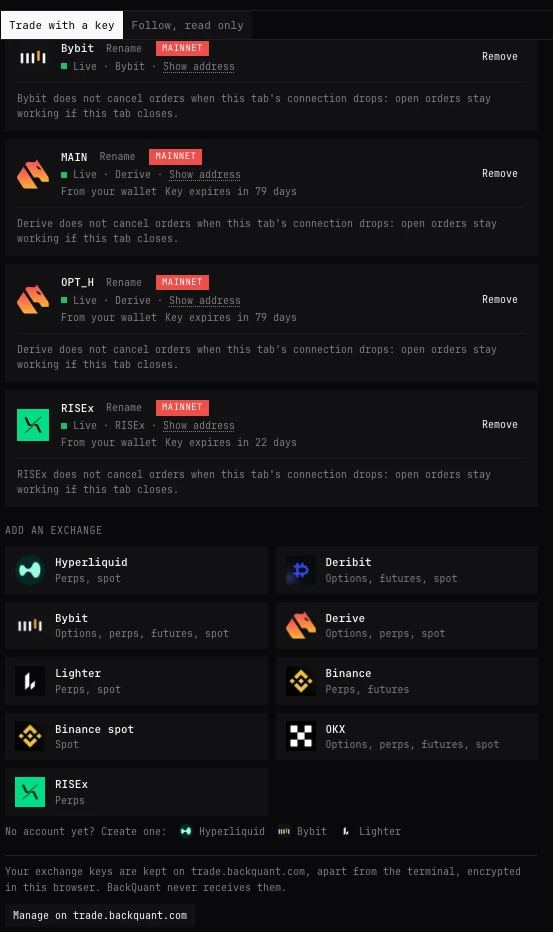
Where Accounts is
- Trade and portfolio pages
- Accounts at the top right, or Settings, Accounts.
- Pro terminal
- Type ACCOUNTS (KEYS and CONNECT do the same), or open Settings, Execution.
- Any trading panel
- The account chip in its header, then Add account... or Manage accounts....
- Add an exchange
- A tile per exchange, with what it trades. Binance spot has a tile of its own. Under the tiles, No account yet? Create one: opens the exchange’s own sign-up page where it has one (Hyperliquid, Lighter and Bybit).
- Where the form opens
- Inside the terminal, on trade.backquant.com, where your keys are kept apart from the terminal. Open in its own tab moves it to a tab of its own, which a wallet’s sign-in or a passkey needs. With a passkey lock on, it opens in its own tab.
- After connecting
- Saved, encrypted, on this device. Start trading closes the form. A notice then says the account’s orders go to the exchange with your own funds, and whether to ask before the first order each session.
Each exchange at a glance
| Exchange | Connects by | Trades | Key made here expires |
|---|---|---|---|
| Hyperliquid | Wallet | Perps (with HIP-3 markets), spot, predictions | 90 days |
| Lighter | Wallet | Perps, spot, predictions | No |
| Derive | Wallet | Options, perps, spot | 90 days |
| RISEx | Wallet | Perps | 30 days |
| Deribit | API key | Options, futures, perps, spot | Set on Deribit |
| Bybit | API key | Options, perps, futures, spot | Set on Bybit |
| Binance | API key | Perps, futures | Set on Binance |
| Binance spot | API key of its own | Spot | Set on Binance |
| OKX | API key | Options, perps, futures, spot | Set on OKX |
- Connects by
- Wallet
- Trades
- Perps (with HIP-3 markets), spot, predictions
- Key made here expires
- 90 days
- Connects by
- Wallet
- Trades
- Perps, spot, predictions
- Key made here expires
- No
- Connects by
- Wallet
- Trades
- Options, perps, spot
- Key made here expires
- 90 days
- Connects by
- Wallet
- Trades
- Perps
- Key made here expires
- 30 days
- Connects by
- API key
- Trades
- Options, futures, perps, spot
- Key made here expires
- Set on Deribit
- Connects by
- API key
- Trades
- Options, perps, futures, spot
- Key made here expires
- Set on Bybit
- Connects by
- API key
- Trades
- Perps, futures
- Key made here expires
- Set on Binance
- Connects by
- API key of its own
- Trades
- Spot
- Key made here expires
- Set on Binance
- Connects by
- API key
- Trades
- Options, perps, futures, spot
- Key made here expires
- Set on OKX
What a wallet key can do
Hyperliquid, Lighter, Derive and RISEx connect only through your wallet. It approves a trading key made in this browser; your wallet’s own key never leaves your wallet. The steps are in Connect an exchange, step by step.
- Hyperliquid
- An API wallet named BackQuant, valid 90 days, approved with BackQuant’s fee. It places and cancels orders; it cannot withdraw or transfer. If the account’s API wallet slots are full, choose one to Replace (whatever used it stops trading), or remove one on Hyperliquid (More, API) and try again.
- Lighter
- A trading key at a free slot of your account, on the main account or a subaccount where the wallet has several. It cannot send funds anywhere but back to you. BackQuant’s fee is approved for a year, revocable on Lighter. If Lighter shows no account for the wallet, paste the address Lighter shows in its account menu and the form says which wallet holds it.
- Derive
- Signing in to Derive signs only the time; that cannot trade or move funds. Then one session key for the subaccounts you tick, valid 90 days, with BackQuant’s fee accepted on it where it asks. It trades on the order book and by RFQ; it cannot transfer, withdraw or make keys.
- RISEx
- A session key valid 30 days. Tick I accept BackQuant’s fee as you register it: the new key approves the fee itself, with no second wallet signature. Then Allow take-profits and stop-losses: an allowance your wallet signs once, for 30 days, that lets RISEx place those orders for this account and nothing else. Not now skips it; orders without a take-profit or stop-loss do not need it.
- No wallet found
- The form links to wallets to install. Reload the page after installing one.
What each exchange’s key needs
Deribit, Bybit, Binance and OKX connect by an API key you make on the exchange. The form is a 3-step guide (make the key, give it the permissions shown and no more, paste it and Connect), and the key is checked with the exchange before it is saved.
- Deribit
- Account, API, Add new key. On: Account: read, Trade: read and write. Off: Wallet. Paste the Client ID and Client secret.
- Bybit
- API Management, Create New Key, System-generated. On: Read-Write, Contract: Orders, Contract: Positions, Spot: Trade (for spot). Off: Wallet, Withdraw. Needs a unified trading account (one balance for every product). Paste the API key and API secret.
- Binance
- API Management, Create API, System generated. On: Enable Reading, Enable Futures. Off: Enable Withdrawals, Permits Universal Transfer, Enable Internal Transfer, Spot & Margin Trading. Needs one-way position mode (one position per market). Paste the API key and Secret key.
- Binance spot
- Its own key, System generated (HMAC). On: Enable Reading, Enable Spot & Margin Trading. Off: Enable Withdrawals, Permits Universal Transfer, Enable Internal Transfer. Spot only: nothing is borrowed, and a pair is never sold short.
- OKX
- Profile, API keys, Create API key. On: Read, Trade. Off: Withdraw. Needs Futures or Multi-currency margin mode and Net (buy/sell) positions. Paste the API key, Secret key and the Passphrase chosen when the key was made.
- Keys that move funds
- Refused before they are saved on Deribit, Bybit and OKX, which show a key’s permissions. Binance does not show them to a browser: its accounts say Permissions not verifiable: withdrawals and transfers must be off, and checking that is yours.
Your accounts
- Each account
- Its exchange, its name, and whether it is connected. Show address reveals its address or key id, hidden by default.
- Rename
- Click the name to change it. The name is what every panel, card and row calls the account.
- Key expires in N days
- Keys made from your wallet expire: Hyperliquid and Derive after 90 days, RISEx after 30. From two weeks before, Renew from your wallet makes a new one.
- Approve from your wallet
- Shown when BackQuant’s fee has changed, or the exchange no longer holds it approved. The key trades again once you approve.
- Not started
- Shown on the second of two keys for the same exchange account: one account runs one key (the first added, until you choose). Use this key instead switches. Orders at the exchange are shown and kept either way. Algorithms or Auto-hedge started with a key run only while it is the key in use.
- Cancel open orders on disconnect
- Where the exchange offers it: the exchange cancels open orders when BackQuant stops (the last tab closed, the computer asleep) or loses its connection. Off by default. What it does says, for that exchange, what is cancelled, how soon, and when it is paused. Offered on Hyperliquid (on an account that has traded $1M), Deribit, Binance futures and OKX. Not offered on Bybit, Derive, Lighter, Binance spot or RISEx: orders there stay working if the tab closes. In full: How the engine works.
- Remove
- Deletes the key from this device. Orders already at the exchange stay there: cancel them first if you want them gone.
Where your keys are
- On trade.backquant.com, in this browser only, encrypted. The terminal trades through them and never sees them. BackQuant never receives them.
- Manage on trade.backquant.com. From Accounts in the terminal: the keys page, where the keys are locked, unlocked and forgotten.
- Lock with a passkey. Face ID, Touch ID, a security key or your device PIN. Keys then open only with it, once per browser session. Stop using the passkey turns it off.
- Forget all keys. Deletes every exchange key from this browser. Your exchange accounts are not affected.
BackQuant’s fee
Only wallet-connected exchanges carry one. Where BackQuant charges a fee, it is 0.01% at most, added to the exchange’s own, and you approve it as the key is made: with your wallet on Hyperliquid, Lighter and Derive, and by the new key on RISEx, where it applies only to orders that take liquidity (fill at once against the book), never to post-only orders. Lighter charges it only on a Plus or Premium account; on Standard, BackQuant is named on your orders and nothing is charged. If Hyperliquid no longer holds the fee approved, every order is refused, closing orders too, until you approve it again in Accounts; cancelling still works, and you can close on Hyperliquid’s own site meanwhile. If RISEx does not hold it approved, orders that take liquidity are refused until you press Approve.
Questions
Can BackQuant withdraw my funds?
No. A key made from your wallet can trade and cannot withdraw or transfer out; an API key is checked for withdrawal and transfer permissions before it is saved, where the exchange shows them (Deribit, Bybit, OKX). On Binance, keeping those off is yours to check.
Can I connect several accounts on one exchange?
Yes. Each is an account of its own, with its own name, in every account list, Positions and orders and the Portfolio page. Each panel on the trade page chooses which account it trades.
I use a second computer. Do my keys follow?
No. Keys are kept in the browser that made them. Connect again on the other device: a wallet makes another trading key, or paste the API key again. Only one browser trades an account at a time; the other watches, and Trade from this device takes it over. See How the engine works.
What happens when a wallet key expires?
From two weeks before, Accounts says Key expires in N days and offers Renew from your wallet. Once expired, the account no longer trades until a new key is made; positions and orders at the exchange are untouched.
Why does Binance need two keys?
Binance futures and Binance spot are separate accounts at Binance, with separate permissions: the Binance key trades perps and futures, the Binance spot key spot only.
More
- Connect an exchange, step by step. What to press, exchange by exchange.
- How the engine works. How keys are encrypted, one device at a time, and cancel on disconnect in full.
- Trading settings. The Accounts section and the rest.